 +91-8727000867
 +64 22 003 5555


Highlights
- Over 70% of startups now prefer cross-platform tools for iOS app projects today.
- Cloud Mac platforms help Windows users manage iOS testing and app builds daily online.
- Flutter and React Native reduce repeated coding work for mobile applications. efficiently.

Co-Founder
Vandana Abrol 
An enthusiastic developer and skilled business management expert with over a decade of experience in the field
Introduction
Many software teams use Windows computers for daily work, yet they still want to publish applications for iPhone and iPad users. Many developers now search for ways to build iOS apps on Windows because purchasing Apple hardware is not always practical for startups, students, freelancers, or growing software companies. Apple primarily supports macOS for app creation, which creates a challenge for people who do not own a Mac. Even so, several viable methods now allow developers, business owners, students, and startup teams to create and test iOS applications while staying on a Windows computer for most tasks.
Still unsure which framework suits your app idea? Read Digittrix's Swift vs Flutter guide for expert mobile app development insights!
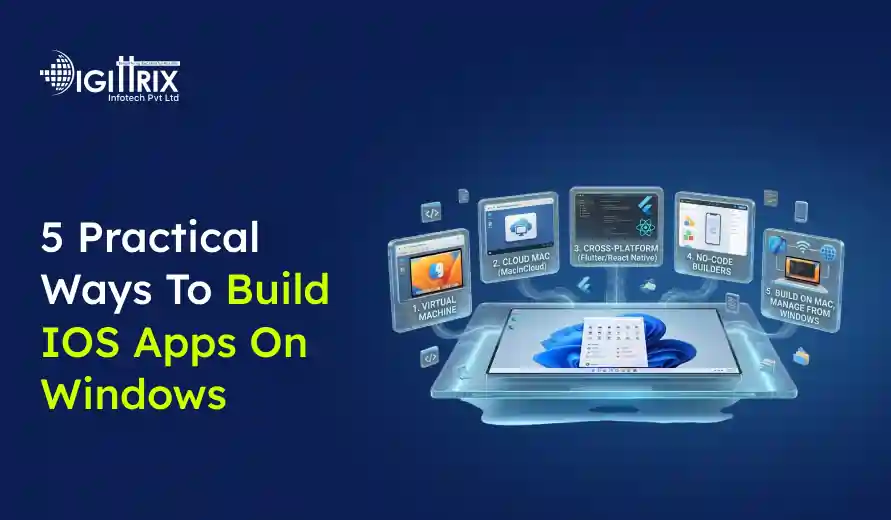
1. Use a Cloud-Based Mac Service to build iOS apps on Windows
One of the most common methods is to use a cloud-hosted Mac computer. In this setup, a company rents access to macOS systems over the internet. Developers connect to the remote Mac from a Windows computer and use Apple tools directly within that remote session.
This method works well because Apple officially supports Xcode only on macOS. By accessing a cloud Mac, developers stay within Apple's guidelines while still using Windows hardware locally.
How Cloud Mac Services Work
A cloud provider offers users a remote macOS desktop. After signing in, developers can install Xcode, create projects, test applications, and submit apps to the Apple App Store.
Most cloud Mac platforms provide:
- Remote macOS access
- Different hardware plans
- Pre-installed development tools
- File transfer support
- Build automation features
- Team account access
- Backup options
Developers connect via remote desktop software or browser-based access panels.
Setup Process
The setup process is usually simple:
- Register for a cloud Mac account
- Select a hardware plan
- Connect from Windows using remote access software
- Install Xcode
- Start coding and testing
Some providers already include Xcode, reducing preparation time.
Advantages of Cloud Mac Systems
Cloud Mac platforms offer several practical benefits:
No Need to Buy Apple Hardware
Buying Mac systems can be expensive for small teams or students. Renting a cloud-based Mac lowers upfront costs.
Access From Anywhere
Developers can sign in using office systems, home computers, or laptops.
Team Collaboration
Many cloud platforms support shared workspaces for coding teams.
Better Resource Management
Developers can select more powerful hardware plans for large application builds.
Limitations
There are still some points to be considered.
Monthly Costs
Long-term usage may become costly for larger projects.
Internet Dependency
A stable internet connection is essential because all work is done remotely.
Performance Delays
Some users may notice slight lag during heavy testing or simulator use.
Best Use Cases
Cloud Mac systems are suitable for:
- Freelance developers
- Startup teams
- Students creating iOS projects
- Agencies handling client applications
- Windows-first development teams
This method remains one of the easiest ways for Windows users to access official Apple tools.
 7-Day Risk Free Start
Start Your 7-Day Free Trial With Proven Experts
If this article sparked a project idea, start with a dedicated expert for 7 days at no risk. Continue at just $10/Hour if the collaboration is the right fit for your business.

Dedicated Expert Access
Work directly with a specialist aligned to your project goals and timeline.

Direct Chat with Your Team
Collaborate in real-time and get instant support.

Screenshots & Reports
Receive regular reports to track progress transparently.

No Contracts
No commitments. Cancel anytime, no hassle.

Limited Slots Available This Week!
Kickstart Your Project With Zero Risk And Total Confidence.


& Growing Brands
2. Install macOS on a Virtual Machine
Another practical option is to run macOS inside a virtual machine on Windows. This approach is often covered in guides on iOS app development for Windows and custom app development because it gives developers access to Apple software tools while staying on their main Windows computer. A virtual machine creates a software-based computer within the main operating system.
In this setup, Windows remains the primary operating system, while macOS runs in a separate environment. Developers can then install Xcode and build iOS applications.
Popular virtualization software includes
- VMware Workstation
- VirtualBox
- Hyper-V
How Virtual Machines Work
The virtualization software allocates system resources, such as memory, processing power, and storage, to a secondary operating system.
After macOS installation, the developer uses the virtual environment almost like a regular Mac computer.
Hardware Requirements
This method works best on robust Windows systems. Typical requirements include:
- Multi-core processor
- At least 16GB RAM
- SSD storage
- Good graphics support
- Large free disk space
Weak hardware may cause slow performance during compilation or simulator testing.
Installation Steps
The process generally includes:
- Install virtualisation software
- Create a new virtual machine
- Add macOS installation files
- Configure processor and memory settings
- Install macOS
- Install Xcode from the App Store
- Start project development
The initial setup may take time for first-time users.
Advantages of Virtual Machines
Full macOS Environment
Developers get direct access to Apple app development tools.
Single Device Workflow
Users continue working on the same Windows computer without changing hardware.
Offline Usage
Projects can be edited without relying on remote internet sessions.
Drawbacks
Setup Complexity
Installing a virtual machine can confuse beginners.
Slower Performance
Virtual systems usually run slower than native hardware.
Compatibility Issues
System updates may sometimes cause configuration problems.
Practical Usage
Virtual machines work well for:
- Personal projects
- Educational practice
- Small application testing
- Early-stage prototypes
For heavy production workloads, developers may later migrate to physical Mac systems or cloud platforms.
 Build iOS Apps on Windows With Expert Mobile App Development Solutions
Need help developing iPhone or iPad apps on Windows systems? Connect with Digittrix for reliable iOS app development services and cross-platform mobile app solutions.
3. Build Cross-Platform Apps With Flutter or React Native to build iOS apps on Windows
Cross-platform frameworks allow developers to build applications for both Android and iOS from a single shared codebase. This reduces duplicate code and helps teams manage projects more easily.
Two widely used frameworks are:
- Flutter
- React Native
Many developers interested in cross-platform app development prefer these frameworks because they reduce redundant coding for Android and iOS projects.
Another growing area is Flutter-based iOS app development, especially for startups and service-based applications.
- Flutter
- React Native
Windows developers can write most application code locally without needing macOS in the early stages of development.
Flutter Development on Windows
Flutter uses the Dart programming language. Google created Flutter to support development for mobile, desktop, and web applications.
Developers can install Flutter on Windows and start building user interfaces immediately, making it ideal for businesses hiring Flutter developers.
Flutter Setup
The setup process usually includes:
- Install Flutter SDK
- Install Android Studio or Visual Studio Code
- Configure Android emulator tools
- Create a Flutter project
- Start coding
Flutter provides hot reload, which quickly updates the application during development.
React Native Development on Windows
React Native uses JavaScript and React concepts. Many web developers prefer this framework because it uses familiar coding structures.
The setup process often includes:
- Install Node.js
- Install React Native CLI
- Install Android Studio
- Configure development tools
- Create a React Native project
iOS Compilation Requirements
Although coding happens on Windows, final iOS application builds still require macOS and Xcode. Because of this limitation, many developers search online for Xcode for Windows solutions, even though Apple officially supports Xcode only on macOS systems.
Developers usually complete most tasks on Windows and later connect to:
- A cloud Mac
- A physical Mac system
- A remote Mac mini
for final packaging and App Store submission.
Benefits of Cross-Platform Frameworks
Shared Codebase
One codebase supports both Android and iOS applications.
Faster Project Handling
Teams spend less time maintaining separate projects.
Large Community Support
Both frameworks offer extensive libraries and documentation.
Lower Development Cost
Businesses reduce expenses because fewer separate codebases are required.
Challenges
Native Feature Access
Some advanced iOS features may require additional native code.
Platform Differences
Design adjustments may still be required to address iOS behavior.
Performance Variation
Certain heavy applications may perform better with fully native development.
Suitable Project Types
Cross-platform frameworks are excellent for:
- Business applications
- E-commerce platforms
- Social networking apps
- Educational apps
- Delivery applications
- Booking systems
This option remains popular among startups and software agencies, especially a mobile app development company managing multiple platforms.
4. Use Remote Mac Access with a Physical Apple Device to build iOS apps on Windows
Some developers use a real Mac computer remotely while continuing their daily work on Windows. In this method, the Mac device may remain in another room, office, or data center while developers connect from their Windows machine.
This approach combines official Apple hardware with the convenience of Windows-based computing.
How Remote Mac Access Works
The Mac system runs macOS, and Xcode is installed locally. Developers connect via remote desktop software.
Popular remote access tools include:
- TeamViewer
- AnyDesk
- Chrome Remote Desktop
- Microsoft Remote Desktop
Once connected, the Mac screen appears on the Windows computer.
Typical Workflow
A common workflow may look like this:
- Write project code on Windows
- Push files to a repository
- Connect to the remote Mac
- Open the project in Xcode
- Run iOS testing
- Generate App Store builds
Some teams automate synchronization using Git platforms.
Advantages of Remote Mac Access
Official Apple Hardware
Using a physical Mac reduces compatibility issues.
Better Performance
Physical Mac systems generally perform better than virtual machines do.
Flexible Work Arrangement
Developers continue using Windows while accessing Apple tools.
Shared Team Access
Multiple developers can share the same Mac infrastructure.
Limitations
Hardware Purchase Required
A physical Mac device remains necessary.
Maintenance Responsibility
Teams must manage updates, backups, and hardware maintenance.
Internet Connection Dependence
Remote work quality depends on network stability.
Recommended Usage
Remote Mac systems fit:
Many professional teams also use this setup when they want to build iPhone apps without every developer in the company owning a Mac.
- Professional development agencies
- Medium-sized software teams
- Businesses publishing frequent updates
- Developers handling App Store releases regularly
Many companies adopt this setup because it balances flexibility with Apple compatibility.
5. Use Browser-Based iOS Development Platforms
Browser-based development platforms offer another practical option for Windows users. They are also useful for beginners exploring how to develop iPhone apps on Windows without dealing with complex local installations for smoother mobile app development. These platforms run coding environments directly in a web browser.
Developers do not need large local installations because the provider hosts most tools online.
Some browser-based systems support:
- Code editing
- Application previews
- Team collaboration
- Cloud builds
- Automatic deployment
- Source control integration
How Browser-Based Development Works
Developers sign in to a web dashboard and create projects online. The provider manages the server environment.
In many cases, coding, testing, and build generation occur within the cloud infrastructure.
Popular Use Cases
Browser-based systems are commonly used for:
- Startup prototypes
- Student projects
- Internal business tools
- Lightweight applications
- Team collaboration projects
Benefits of Browser-Based Platforms
Quick Setup
Users avoid complex software installations.
Lower Hardware Requirements
Even older Windows systems can support browser-based development.
Easy Collaboration
Team members can work on the same project from different locations.
Automatic Backups
Most platforms store project data in the cloud.
Limitations
Limited Customization
Some browser systems offer fewer advanced configuration options.
Subscription Fees
Many services require a monthly payment.
Internet Requirement
Projects rely heavily on internet access.
Publishing Considerations
Some browser-based platforms still require access to Apple Developer accounts and macOS build systems for final App Store submission.
Developers should verify:
- Apple publishing support
- Export capabilities
- Build limitations
- Device testing options
before selecting a browser-based platform.
Need Expert Help for iOS App Development on Windows?
From Flutter and React Native to cloud-based Mac solutions, Digittrix delivers complete mobile app development services tailored to your business goals.
Important Factors Before Choosing a Method
Every iOS development setup involves different trade-offs. Before selecting a method, developers should evaluate several practical factors.
Budget
Some methods require:
- Monthly subscriptions
- Hardware purchases
- Cloud storage fees
- Apple Developer Program membership
Small projects may work well with lower-cost setups, whereas commercial products may justify larger investments.
Technical Experience
Beginners may prefer:
- Cloud Mac systems
- Browser-based platforms
- Cross-platform frameworks
Advanced developers may be comfortable handling virtual machine configurations or custom remote infrastructure, while businesses often prefer hiring iOS developers for complex projects.
Project Size
Small applications often work well with lightweight setups.
Larger applications involving:
- Heavy graphics
- Advanced animations
- Machine learning
- Real-time communication
May require stronger hardware and native development tools.
Testing Requirements
Real-device testing remains important for iOS applications.
Developers should plan access to:
- iPhone devices
- iPad devices
- Simulator tools
- Crash reporting systems
- Performance testing tools
App Store Submission
Apple maintains strict review guidelines. Developers must:
- Register for an Apple Developer account
- Follow privacy rules
- Meet interface standards
- Pass security checks
- Submit builds through Apple systems
Even Windows-based workflows eventually interact with Apple's publishing environment.
Security and Backup Considerations
Application projects often contain sensitive information, including:
- API keys
- User credentials
- Payment integration details
- Customer information
- Business logic
Developers should safeguard project data carefully.
Recommended Security Practices
Use Version Control
Git repositories help track project history and reduce the risk of accidental data loss.
Enable Two-Factor Authentication
Apple developer accounts should enable extra account protection.
Store Backups Regularly
Cloud storage and external drives help prevent project data loss.
Restrict Team Permissions
Only approved team members should access the production systems.
Data Privacy
Applications that handle personal user information must comply with privacy regulations.
Developers should create:
- Privacy policies
- Permission disclosures
- Secure authentication systems
- Protected data storage methods
This becomes especially important for healthcare, finance, and e-commerce applications.
Future Trends for Windows-Based iOS Development
The software industry continues to change rapidly. Cross-platform tools and cloud infrastructure are becoming more common among development teams.
More companies now support:
- Cloud compilation
- Browser-based coding
- Shared team environments
- Remote testing systems
- Automated deployment pipelines
Artificial intelligence tools are also assisting developers with code suggestions, testing, and debugging.
At the same time, Apple continues to focus heavily on its own ecosystem. As a result, macOS access will likely remain necessary for final iOS publishing in the foreseeable future.
Even so, Windows users now have more practical options than ever.
Planning a next-generation mobile app? Check out Digittrix’s latest iOS development trends for innovative app ideas and technologies!
Final Words
Building iOS applications on Windows is entirely feasible through several practical methods. Developers can build iOS apps on Windows by choosing the right combination of cloud services, remote Mac access, virtual machines, or cross-platform frameworks. Developers no longer need to rely entirely on owning a local Mac computer from the start of a project.
Cloud Mac services provide direct access to official Apple tools over the internet. Virtual machines enable macOS installation on Windows systems. Cross-platform frameworks enable shared application code for Android and iOS projects. Remote Mac access combines Windows flexibility with physical Apple hardware. Browser-based platforms simplify setup with cloud-hosted development environments.
Build iOS Apps on Windows with Digittrix
Building iOS applications traditionally requires Apple hardware, but many developers and businesses now seek practical ways to create iPhone and iPad apps on Windows systems. Different development approaches, cloud tools, and cross-platform technologies now make it possible to handle iOS app projects without relying entirely on a Mac device.
Digittrix is a trusted website and app development company with experience since 2014 in mobile app development and software solutions. We help clients build iOS applications for e-commerce, healthcare, education, logistics, booking systems, fitness platforms, and other business sectors, while efficiently managing development workflows.
Call +91 8727000867 or email digittrix@gmail.com to discuss iOS app development solutions for your business.
 FAQ's
FAQ's