Chat with us
Websites, factory apps & connected operations

Manufacturing Website & App Development

Digittrix is a manufacturing software development company in India. We build factory websites, Android and iOS apps, and connected business software for product enquiries, production, inventory, quality checks and dealer relationships.

  • Since 2014 Product delivery experience
  • Mobile + Web Factory, office & dealer tools
  • Enquiry to Dispatch Connected operational workflows
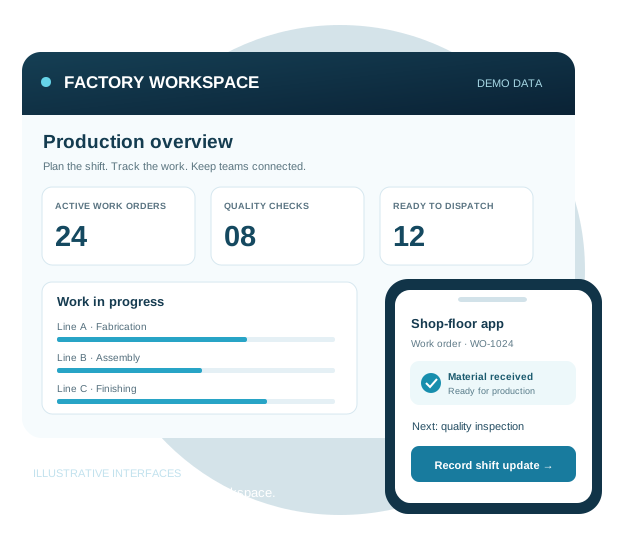
Illustrative manufacturing production dashboard and shop-floor mobile app

Cross-Industry Delivery Experience

Selected organizations represented across Digittrix’s broader product portfolio. These cross-industry references are not a list of manufacturing clients. Explore the published work and client reviews for each project’s actual scope.

HappyFidos brand logo
Dudar company logo
Swach Bharat mission logo
Amrutam brand logo
Broomy brand logo
Pongo company logo
GoodLives company logo
Zajel company logo
Satyamev Jayate logo
IKEA brand logo
O&M company logo
CarryOn brand logo
Kazo brand logo
Petovac company logo

Manufacturing App Development for Factory Teams

Manufacturing app development turns factory tasks into mobile and web workflows for operators, supervisors and customers. A production app can capture shift output, material use and inspection results against a work order. A customer portal can share approved order updates. These tools can connect to your existing systems through APIs.

Digittrix provides website development, mobile app development and custom ERP and CRM development from Mohali, Punjab. Start with one business need, then add interfaces and integrations when the process is proven.

Web + mobile
Factory and customer experiences
Role-based
Operator, manager and dealer access
Your process
Orders, materials and approvals
Choose the right starting point

Website, Factory App, ERP, MRP or MES?

These tools solve different problems. Begin with the decision or task your team needs to improve, then decide whether to configure an existing product, connect it or build a custom workflow.

Scope guide: a focused website or app does not automatically include a complete ERP, MRP or MES system.
SolutionMain purposeWhen it fits
Manufacturing websitePresent products, technical specifications and capabilities; collect requests for quotation (RFQs).Buyers need clear product information and an enquiry route.
Factory app or B2B portalGive operators, managers or dealers access to a defined workflow.A specific task needs mobile capture, approvals or customer visibility.
Enterprise resource planning (ERP)Connect business records across purchasing, inventory, sales and finance.Departments need consistent master data and coordinated transactions.
Material requirements planning (MRP)Calculate material requirements using demand, bills of materials, stock and lead times.Planners need to determine what materials to obtain and when.
Manufacturing execution system (MES)Track and document detailed production execution on the factory floor.Operations need deeper work-order, process and production traceability.

For the underlying terms, see SAP’s explanations of MRP and MES. The comparison describes software categories, not a claim of SAP partnership or a prebuilt integration.

Eight ways to connect your manufacturing business

Manufacturing Websites & Apps We Develop

Choose the starting point that fits your operations. Connect your website, shop floor and customer experience through workflows designed around the products you make.

Manufacturing Website Development

Present your products, production capabilities and technical documents in a website built around buyer enquiries. Give your team a CMS for catalogues, specifications and company updates.

  • Product catalogues
  • RFQ forms
  • Technical downloads
Plan this manufacturing solution

Website, App & Software Development Services

Choose a public website to reach buyers, an app to support factory teams or custom software to connect departments. We plan the interfaces and shared records needed for your first release.

From discovery to factory rollout

Build around the way your teams work

Map your product enquiries, production responsibilities and operational reporting before development begins.

Manufacturing Website Design & B2B Portals

Help industrial buyers compare products, review specifications and request a quotation. We build catalogue pages and enquiry forms around your sales process, with a private portal for returning customers when needed.

  • Responsive websites and CMS
  • Product catalogues and specifications
  • RFQ and enquiry workflows
  • Customer and dealer portals

Manufacturing Mobile App Development

Give operators a practical way to record work on the devices they use each day. We design Android and iOS screens for scanning, shift updates and inspections, accounting for factory conditions and connectivity.

  • Android, iOS or cross-platform apps
  • Camera and barcode capture
  • Shift updates and notifications
  • Offline drafts when scoped

Custom Manufacturing Software Development

Connect production, stock and quality records around your operating procedures. We define who can create, approve and update each record, then build the workflows and reports your teams need.

  • Production planning and work orders
  • Inventory and procurement
  • Quality and maintenance workflows
  • Dashboards and role permissions

Manufacturing ERP Development & Integration

Extend your existing ERP with a focused app or custom module. We review API access, record ownership and migration needs, then test how updates move between systems and recover from failures.

  • ERP, CRM and accounting APIs
  • Data mapping and migration
  • Integration testing and rollout
  • Handover and maintenance options
Connect the work behind every product

Software Solutions for Manufacturing Companies

Bring production, materials, quality and maintenance records into one coordinated process. Choose the modules your team needs first, then plan integrations and later releases.

Production planning & bills of materials

Connect each work order to an approved bill of materials (BOM), routing and work centre. Record planned quantities, actual output, scrap and rework for supervisor review.

Inventory & batch traceability

Link raw-material lots, work-in-progress (WIP) and finished-goods batches. Record receipts, consumption, transfers and quality holds against the relevant work order.

Quality management

Capture inspection evidence, quarantine decisions and corrective actions with a record of who approved them.

Dealer & customer management

Keep enquiries, quotation versions and order updates together across your sales and fulfilment teams.

Purchasing & approvals

Route purchase requests to the right approver and reconcile ordered quantities with goods received.

Equipment maintenance & downtime

Keep an asset register, preventive-maintenance schedule and breakdown history. Agree downtime reason codes and reporting rules before using the records in performance reports.

Design around your operating process

Benefits of Custom Manufacturing Software

Custom software can address gaps that spreadsheets or existing systems leave between teams. The value depends on reliable data, staff adoption and a clearly defined process.

Workflows that fit your factory

Configure job stages, inspection points and approval rules around your products and teams. Operators can capture the records required for the task without working through unrelated screens.

Clearer production and stock records

Connect work orders, material issues, accepted output and quality holds. Managers can trace an exception to its source and compare reported quantities before approving the next step.

Less repeated data entry

Share agreed records between your app, customer portal and ERP through tested integrations. Record ownership and retry controls help teams avoid duplicate or conflicting updates.

A practical path to expansion

Start with one line or department, review the pilot and add modules as needed. Agree data exports, source-code handover and support terms so future changes have a clear foundation.

Evaluate the pilot using agreed measures such as missing entries, stock discrepancies, approval turnaround and time spent retrieving records. Improvements should be measured against your own baseline.

The Right Tools for Every Role

Start with the task each person needs to complete. Give operators, production managers and dealers focused interfaces with permissions for their role.

Capture the work where it happens

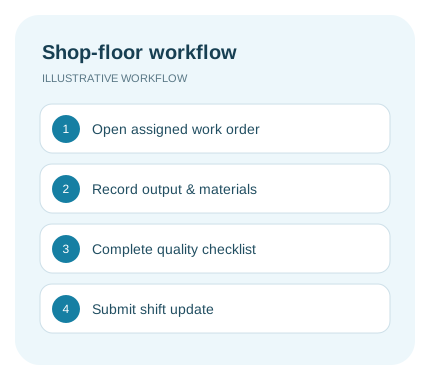
Give shop-floor teams a focused view of assigned jobs, material movements and quality checks.

  • Assigned work orders
  • Shift production entries
  • Barcode or QR capture
  • Material issue records
  • Inspection checklists
  • Defect photos and notes
  • Breakdown reporting
  • Offline drafts when scoped
Operators & Quality Teams illustrative workflow

See jobs, exceptions and approvals

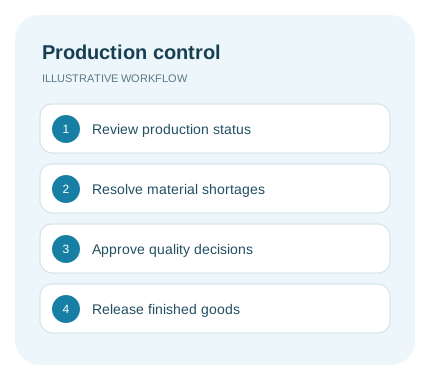
Bring production, inventory and quality information into one workspace so managers can decide what needs attention.

  • Production status dashboard
  • Work-centre scheduling
  • Work-in-progress visibility
  • Stock and shortage alerts
  • Purchase approval queues
  • Quality review and rework
  • Maintenance planning
  • Reports and audit history
Production Managers illustrative workflow

Connect customers without exposing internal records

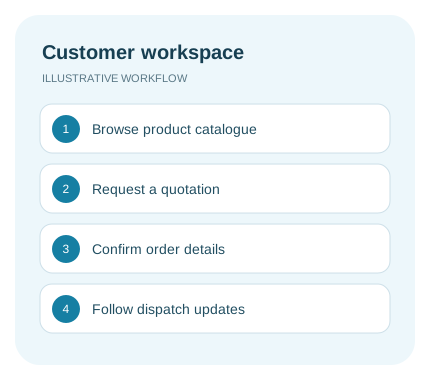
Share approved product and order information while administrators control access and business rules.

  • Private product catalogues
  • Quotation requests
  • Customer order updates
  • Shared technical documents
  • Invoice visibility when scoped
  • Role-based access controls
  • Notification preferences
  • Data exports and configuration
Dealers & Administrators illustrative workflow
A connected manufacturing journey

From Product Enquiry to Finished-Goods Dispatch

Keep responsibilities, records and decisions connected at every stage.

01

Enquire & quote

Capture specifications, prepare a quotation and confirm the customer order.

02

Plan & procure

Create work orders, check material availability and assign production capacity.

03

Produce & inspect

Record shift output, material consumption, quality checks and rework decisions.

04

Dispatch & update

Record finished goods, release approved dispatches and share customer updates.

Illustrative workflow · fictional quantities

How a Production Order Becomes Dispatch-Ready Stock

Consider a metal-parts manufacturer producing 100 housings. This planning example shows the records and decisions a custom app could connect; it is not a delivered client project or a performance claim.

  1. Confirm the work order

    The planner records the product revision, quantity of 100, due date, routing and approved bill of materials.

  2. Issue the material

    The storekeeper allocates the raw-material lot to the job. A shortage creates an exception for review rather than an unrecorded stock adjustment.

  3. Record production

    The operator submits output, material consumption and any scrap or downtime. Queued mobile entries retain a unique reference to avoid duplicate posting.

  4. Review quality

    The inspector accepts 95 housings and places 5 on hold for rework. The record keeps the inspection result, reason and responsible person together.

  5. Release finished goods

    The warehouse receives 95 accepted units. The 5 held units remain unavailable for dispatch until the agreed review releases them.

Acceptance checks: totals reconcile across material and output records; a repeated scan does not duplicate stock; held items cannot be dispatched; dealers can see only their own approved order updates.

Connect the systems you already use

ERP Integration, Data Migration & Factory App Controls

Our industrial software development services connect applications with the systems your factory already uses. Each integration needs a source for every record, a recovery path for failed updates and tests using your operating scenarios.

ERP, CRM & accounting

Confirm which system owns products, customers, stock and invoices. Map API fields, units, identifiers and update frequency. Log failures and reconcile retries before rollout.

Explore ERP and CRM development →

Barcode devices & offline work

Test camera scanning or dedicated scanners on the devices your staff use. Define offline records, upload queues and conflict handling; live stock availability may require connectivity.

Machine data & IoT

Assess gateways, available protocols and network access before promising equipment connectivity. Begin with a defined monitoring use case and validate the data against the source equipment.

Explore IoT development →

Migration, permissions & recovery

Clean and map product, supplier and opening-stock records. Test access by role, approval history, backup restoration and exports. Agree a cutover and rollback plan with the operations team.

Technology blueprint

Technology & Backend Architecture

We select the stack around your website, mobile apps, production records, offline requirements and existing business systems. Integrations and infrastructure are chosen for the agreed release.

Architecture layers

Technology choices are finalized during discovery against product scope, role permissions, factory connectivity, integration requirements, and operating model.

01 · Web & factory experience

Frontend & Mobile

Next.js, Flutter, Swift, and Kotlin support responsive web, cross-platform, and native experiences for operators, production managers, and dealers.

4 technologies
Next.js logo

Next.js

Flutter logo

Flutter

Swift logo

Swift

Kotlin logo

Kotlin

02 · Orders & workflows

Backend APIs

Node.js, PHP, Laravel, Python, and CodeIgniter support production records, estimate calculations, approval queues, document access, notifications, and administration.

5 technologies
Node.js logo

Node.js

PHP logo

PHP

Laravel logo

Laravel

Python logo

Python

CodeIgniter logo

CodeIgniter

03 · Batches & records

Data Layer

Relational, document, and real-time data services are selected around profiles, production records, documents, approvals, reporting, retention, and deletion workflows.

5 technologies
MySQL logo

MySQL

MongoDB logo

MongoDB

PostgreSQL logo

PostgreSQL

Firebase logo

Firebase

MariaDB logo

MariaDB

04 · Scale & release

Cloud Delivery

Azure, Docker, Google Cloud, Vercel, and Netlify support controlled environments, release automation, observability, scalable infrastructure, and web delivery.

5 technologies
Microsoft Azure logo

Microsoft Azure

Docker logo

Docker

Google Cloud logo

Google Cloud

Vercel logo

Vercel

Netlify logo

Netlify

05 · Collections & billing

Payments & Billing

Stripe, Razorpay, PayPal, and Cashfree can support agreed deposit or milestone payments, refunds and payment-status updates. Invoice rules and accounting reconciliation are scoped separately.

4 technologies
Stripe payment logo

Stripe

Razorpay logo

Razorpay

PayPal logo

PayPal

Cashfree logo

Cashfree

06 · Identity & access

Authentication

Token-based access is combined with the agreed email, phone, OTP, social sign-in, session, device, and role controls.

1 core technology

JWT

Define your first release

Manufacturing Website & App Development Cost

The cost of manufacturing app development depends on user roles, interfaces, offline workflows, data migration and integrations. A company website, a focused factory app and a connected operations platform require different scopes.

Starting pointTypical scope to discussWhat affects the estimate
Company websiteProduct catalogue, capability pages, CMS and RFQ formsPage count, product data, languages and enquiry routing
Portal or mobile app pilotA focused workflow for operators, dealers or customersUser roles, scanning, offline capture and notifications
Connected manufacturing platformSelected production, inventory, quality and maintenance modulesLocations, data migration, ERP APIs and equipment integrations

Your proposal confirms the development budget, delivery milestones, acceptance checks and support coverage. Hosting, app-store accounts, messaging and third-party licences are identified separately. The features on this page are options to scope around your business.

What to Send for a Useful Estimate

Share your product catalogue or sample specification, one current workflow, user roles and locations, device needs, existing software and available API access. Include any data to migrate and the deadline you are working toward.

A focused pilot brief might be: one production line, operator and supervisor roles, work-order entry, a quality checklist and a web dashboard. ERP synchronization, machine connections and offline editing should be estimated explicitly.

Delivery planning: approve the scope and sample screens first, then agree milestones for implementation, integration testing, user acceptance and rollout. Content readiness, clean source data and access to external systems influence the schedule.

How to Develop a Manufacturing Management App

Begin with one workflow and the records it needs. Validate sample screens with users, implement the agreed scope, test exceptions and run a pilot before rolling out to more teams.

Workflow Discovery

Map products, user roles, work orders, approval rules and existing systems.

UI/UX Strategy

Test website enquiry paths and factory screens with the people who will use them.

Agile Development

Build the approved screens, production APIs and workflows in reviewable releases.

Quality Assurance

Test stock reconciliation, partial orders, rejected batches, permissions and failed syncs.

Pilot & Rollout

Validate one agreed workflow, train users and review acceptance checks before expansion.

Technical Support

Handover, monitoring and support as agreed in your project plan.

Plan your next step

Manufacturing Development FAQs

Answers on factory websites, production apps, integrations, cost and support.

Can you build a manufacturing website and a mobile app together?

Yes. A public website, customer portal, factory mobile app and web admin panel can share agreed data and workflows. You can also start with one interface and add other tools in later releases.

What should a manufacturing company website include?

Start with product categories, capabilities, technical specifications, company information and a clear request-for-quotation form. A CMS lets your team maintain content. Dealer pricing, customer accounts and order tracking can be added when required.

Can you integrate our existing ERP or accounting system?

We review the system, API access and licensing before confirming the integration. The scope defines record ownership, field mapping, synchronization frequency and the handling of failed or duplicate updates.

Can operators use the app without an internet connection?

Offline drafts and queued uploads can be included for selected workflows. We agree which records are available offline, how updates synchronize and how conflicts are resolved. Live dashboards need connectivity to receive new data.

Can you include barcode scanning and batch traceability?

Yes. Barcode or QR scanning can support materials, work orders and finished goods. Traceability depends on the identifiers, records and scanning steps agreed with your team; device compatibility is checked during discovery.

Can the platform connect to machines or IoT sensors?

Machine or sensor integration is assessed separately against available gateways, protocols, access and network conditions. A website or mobile app does not automatically connect to equipment. We validate a defined integration before wider rollout.

How much does manufacturing website or app development cost?

The estimate depends on interfaces, user roles, production workflows, migration, offline needs and integrations. After reviewing your requirements, we provide a proposal with deliverables, milestones and separately identified hosting and third-party costs.

How long does development take?

A company website and a connected factory platform require different delivery plans. We agree milestones for discovery, design, development, testing and rollout after the scope is clear. Content, API access, feedback and app-store review can affect launch dates.

Can we start with one department or production line?

Yes. A focused pilot can cover one production line, location or workflow. We agree acceptance checks with the users, review the pilot and plan expansion around what your team learns.

Do you provide source code handover and support?

Source code handover, documentation, training and support coverage are defined in the project agreement. Maintenance can cover updates, monitoring and agreed improvements, with third-party subscriptions and licences identified separately.

Do I need a manufacturing website, an ERP system or a factory app?

Choose a website for product discovery and enquiries, an ERP system for connected business records, and a factory app for a focused operator or supervisor workflow. Material requirements planning (MRP) calculates material needs from demand, bills of materials and available stock. A manufacturing execution system (MES) manages detailed production execution. A custom app can connect to an existing system without replacing it.

Can you develop manufacturing ERP and production management software?

Yes. We can scope custom production, inventory, purchasing and customer workflows or connect a focused application to your existing ERP. We first confirm which system owns products, stock, work orders and financial records. A full ERP or MES replacement requires its own discovery and migration plan.

How do I choose a manufacturing web development company?

Choose a team that can organize technical product information and build an enquiry journey for industrial buyers. Ask for relevant website evidence, a sample product page, mobile usability checks, CMS handover and a plan for handling quotation requests. Compare the agreed deliverables and support terms, as well as the price.

What should be included when a factory management system is handed over?

Expect a workflow map, agreed release scope, permission model, tested software and the handover specified in your agreement. Acceptance tests should cover material shortages, partial completion, rejected batches, repeated scans and failed synchronization. Reconcile pilot stock movements and accepted output before expanding to more lines or locations.

Where is your manufacturing website and app development team based?

Digittrix is based in Mohali, Punjab, India, and works with businesses in India and international markets. Discovery, design reviews and delivery can be coordinated remotely. Factory visits, device trials and any on-site rollout are agreed separately in the project scope.

India-based team · international delivery

Manufacturing Website & App Development in India

Digittrix Infotech Private Limited is based in Mohali, Punjab, and works with businesses in India and international markets. Our team handles discovery, interface design, development and testing, with training, handover and support defined in the project agreement.

Discuss Your Factory’s Workflow

Our office is at 3rd Floor, Elevate Towers, E 300, Industrial Area, Sector 75, Sahibzada Ajit Singh Nagar, Punjab 140307, India. Remote reviews can include your production, warehouse, quality and sales teams; any on-site work is agreed separately.

Contact Digittrix · Harsh Abrol, Co-Founder · About our team

Choose a Development Partner

Ask for relevant project evidence, a sample workflow, integration assumptions, acceptance criteria and handover terms. Check who owns the source code, cloud accounts and data, and what support covers after launch.

Content updated . Project scope and estimates are confirmed in your proposal.

Build your next stage of growth

Connect Your Factory, Office & Customers

Tell us what you manufacture, which systems you use and where work gets held up. We’ll help define a practical first release for your business.

Discuss Your Manufacturing Project