 +91-8727000867
 +64 22 003 5555

Existing estates vary
Camera type, connectivity, location, coverage, and stream quality determine whether an installed feed can join the monitoring workflow.

AI surveillance · existing-camera intelligence
Adding real-time AI tracking to compatible existing cameras
Quick answer: Surnexo applies AI detection to compatible camera feeds. Its public product describes fight and violence detection, watchlist face matching, fire and smoke detection, fall alerts, and people counting. Events feed a shared dashboard and notification workflow for operator review. Digittrix confirms the AI-camera project scope, and the Surnexo website publicly credits Digittrix.
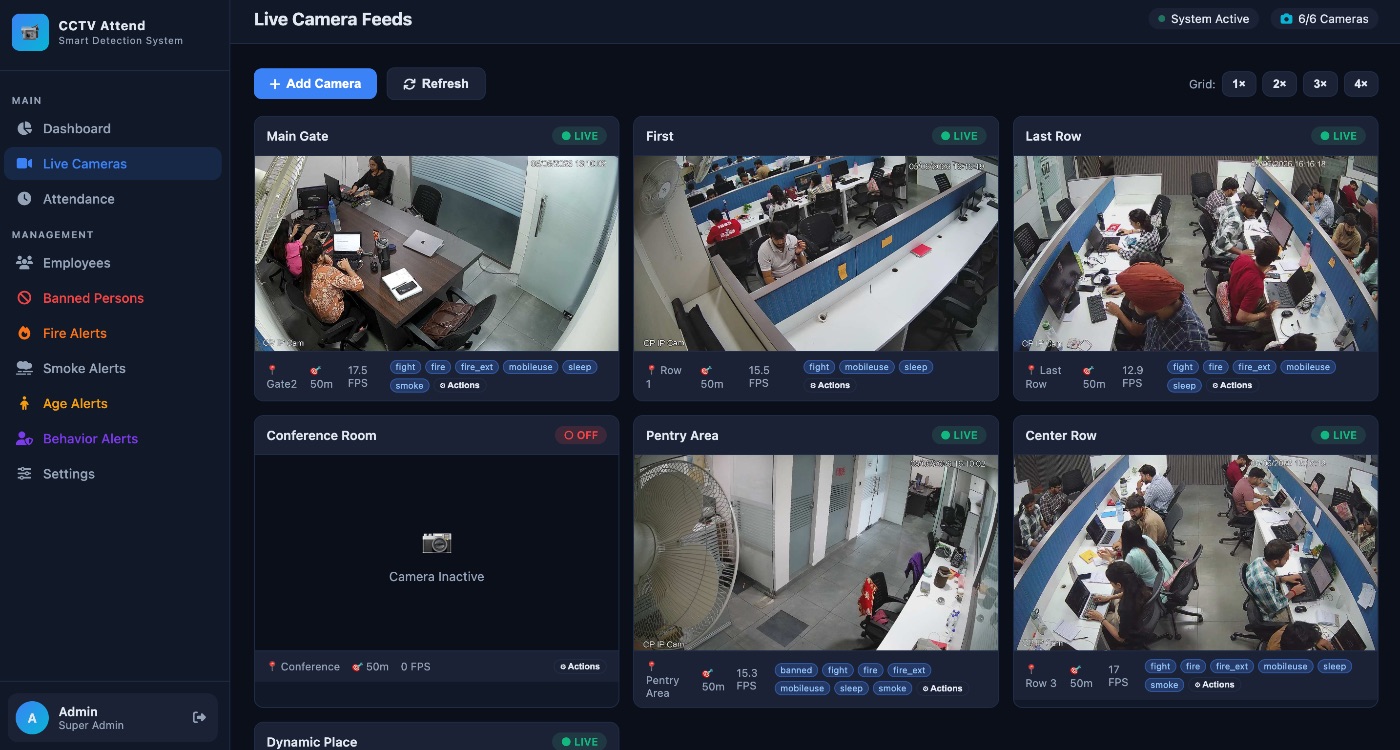
The surveillance challenge
Many sites already have cameras, but their feeds can remain passive, fragmented, and dependent on constant human attention. The product challenge is to work with a compatible installed camera estate while making important activity easier to detect, follow, and review.
Camera type, connectivity, location, coverage, and stream quality determine whether an installed feed can join the monitoring workflow.
Watching several live feeds continuously makes it difficult to notice unusual behaviour or follow one subject between cameras.
A useful signal needs context, an alert route, a visual record, and a clear way for an authorised operator to review what happened.
Public product shape
Surnexo’s public product pages describe a monitoring layer that connects compatible cameras, analyses video, carries subjects across feeds, and turns configured events into alerts. This section documents that published product shape rather than inferring the private implementation.
A compatibility check and system-planning flow establish the property, camera estate, network, and desired detections before feeds are connected.
The current feature catalogue includes fight and violence detection, watchlist face matching, fire and smoke detection, fall alerts, and people counting. The public tracking pages also describe following a subject between camera views.
Event notifications, snapshots, movement mapping, history playback, and multi-device access give operators a route from signal to investigation.
Product workflow
The public journey moves from camera assessment and connection to continuous analysis, cross-feed context, and operator review.
Review the site, compatible cameras, connectivity, coverage, and the events the team wants to detect.
Bring supported camera feeds into the monitoring experience and configure the relevant views, zones, and rules.
Analyse live footage for configured people, vehicles, objects, or behaviours and follow subjects across available camera views.
Surface an alert with visual context, then use live views, snapshots, or event history to assess the incident.
What can be observed
The defensible outcome is the visible product model: compatible camera feeds become inputs to a unified detection, tracking, alerting, and review experience. No unverified performance metric is needed to explain the operational value.
Compatibility-led onboarding gives organisations a way to evaluate existing cameras before deciding where new hardware is actually required.
Multi-camera tracking and movement history organise separate views around the subject or event an operator is following.
Configured detections can progress into alerts, snapshots, live review, and event history instead of remaining passive footage.
Evidence note
The project scope was supplied for this case study by Digittrix. The live Surnexo website independently supports the product description and currently states “Built by DIGITTRIX”; that public credit does not specify which team built each AI model, camera connector, infrastructure component, mobile surface, or subsequent release.
Real-time performance, camera compatibility, detection or recognition accuracy, alert latency, encryption, privacy compliance, availability, model ownership, deployment scale, adoption, and commercial outcomes were not independently tested. Numeric marketing claims on the public site are deliberately excluded. Surnexo describes mobile access, but no official public app-store listing was verified on the source-check date.
Source trail
Each source has a specific role. Institution or brand references are not presented as proof of a private engagement unless the source itself provides attribution.
Feature catalogue and compatible-camera workflow reviewed on 5 October 2026, including fight detection, watchlist face matching, safety alerts and the public “Built by DIGITTRIX” credit.
Published camera connection, AI monitoring, and alert sequence.
Published subject recognition, camera handover, movement mapping, history, and zone-alert capabilities.
Published live-feed, detection-zone, multi-device, and operator-access experience.
Published notification, zone, snapshot, and event-history behaviours.
Public discovery form that asks about the property, location, and existing-camera status.
Public data-handling terms and Digittrix controller identification.
Build with context
Define camera compatibility, edge and cloud boundaries, event taxonomy, model signals, zones, alerts, operator review, permissions, audit history, privacy, and retention before implementation.