Chat with us

MyPlubo · educational game app development

Plubo Educational Game App Case Study

Turning mathematical challenges into guided play

Project overview: Digittrix developed Plubo (MyPlubo), a children’s mathematics puzzle app demonstrated on Android. It combines movable numbered coins, visual instructions and narrated hints. Explore the app recording and client Praveen’s account of the development work below.

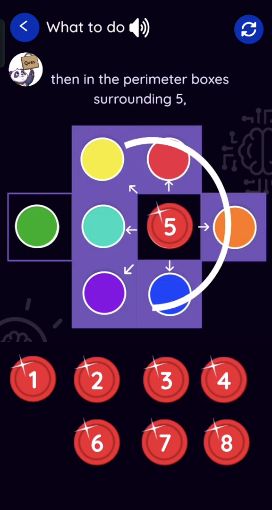
MyPlubo introduction screen with its panda character and A World of Logical Adventures tagline Plubo visual instructions showing the neighbouring positions around a numbered coin
Inside the MyPlubo Android demonstration Cropped frames from the supplied app recording, reviewed on 16 October 2026.
Product
Children’s math puzzle app
Demonstrated platform
Android
Core experience
Play, listen and explore hints
Project evidence
App demo + named client review

Product walkthrough · 16 October 2026

Watch the MyPlubo Android app demo

Explore Plubo’s number-placement puzzles, visual instructions and narrated hints in this 10-minute, 53-second app recording.

The recording includes portrait screens and sideways landscape puzzle views. Timestamps open the corresponding section on YouTube.

Watch the full demo on YouTube ↗
  1. 0:15 Perfect-square neighbours ↗

    Arrange numbered coins so each neighbouring pair adds up to a perfect square.

  2. 1:38 Hints and reasoning ↗

    Follow spoken guidance and visual examples for approaching the puzzle.

  3. 2:56 Keep consecutive numbers apart ↗

    Place eight numbers so consecutive values do not touch horizontally, vertically or diagonally.

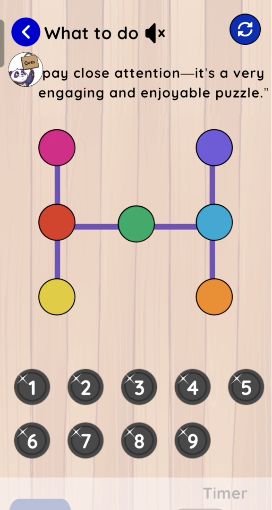
  4. 5:32 Equal products on an H-shaped board ↗

    Choose seven of nine numbered coins and make the product along each three-circle line equal.

  5. 8:43 Hindi narration ↗

    The later portion demonstrates spoken puzzle guidance in Hindi.

Recorded app screens

Visual guidance for different puzzle rules

These frames come from the supplied demonstration. The numbered coins, coloured positions and on-screen prompts make each puzzle’s rules visible alongside spoken guidance.

Client video review

Praveen on developing the Plubo app

Praveen names Plubo in his video and explains why coordinating the puzzle visuals, audio and coin movement required close collaboration. He discusses the evolving UI/UX and the team’s patience with repeated feedback.

Children’s learning app

Praveen’s Plubo mathematics app review

Review summary: Praveen names Plubo, his mathematics app for children, and discusses audio/visual coordination, sliding coins, UI/UX improvements and the team’s patience with repeated feedback.

1 min 33 sec · Published
Digittrix’s YouTube channel

Watch on YouTube

The development challenge

Make the puzzle logic and its explanation work together

In his review, Praveen identifies audio/visual coordination and sliding coins as demanding parts of the project. The experience needed to connect the rules children hear with the objects they see and move.

Different rules, clear interactions

Perfect-square sums, adjacency restrictions and equal products each require a distinct board and an understandable explanation.

Guidance within the activity

Instructions and hints need to point to the relevant numbers and positions so learners can follow the reasoning on screen.

Refinement through feedback

Praveen describes a gradual process of aligning the implementation with his ideas and improving the interface through repeated revisions.

The demonstrated product

An educational game built around trying and understanding

The Android walkthrough shows how Plubo presents mathematical constraints through visual boards, numbered coins and guided explanations.

01

Interactive number puzzles

Numbered coins and coloured target positions turn abstract arithmetic rules into a placement activity.

02

Spoken and visual instructions

The “What to do” screens combine written prompts, narration and visual examples that explain each challenge.

03

Hints that explain the reasoning

Hint screens walk through possible approaches and use the puzzle board to illustrate relationships between numbers.

04

Controls for repeated attempts

The recording shows menu, hint and reset controls, plus timer and move-count displays on puzzle screens.

Product workflow

From the puzzle rule to a fresh attempt

The demo moves between play, instructions and hints, keeping the explanation close to the activity.

  1. 01

    Understand the rule

    Read or listen to the instruction for the selected mathematical challenge.

  2. 02

    Arrange the coins

    Try a placement using the numbered coins and the board’s coloured positions.

  3. 03

    Explore a hint

    Use narrated and visual guidance to examine the reasoning behind an approach.

  4. 04

    Try again

    Return to the puzzle and use the available reset controls for another attempt.

Delivered experience and client feedback

A working app demonstration, backed by the client’s account

The supplied recording documents the product experience. Praveen’s review provides a separate account of working with Digittrix on Plubo.

Several mathematical challenges

The walkthrough demonstrates three distinct puzzle formats, with instructions and hints that explain their rules.

A refined interface

Praveen praises the resulting UI/UX and says the work went beyond his expectations. This is his assessment of the collaboration.

Patient iteration

He highlights Harsh’s cooperation and the team’s persistence through repeated corrections, then recommends working with Digittrix.

Evidence note

About this case study

This page was prepared by Digittrix from the supplied MyPlubo Android recording and Praveen’s published Plubo testimonial. Product descriptions refer to what the recording shows; the review summarises the client’s own experience. No download totals, revenue figures or measured learning improvements are reported.

Source trail

Sources used for this publication

Watch the original product recording and the project-specific client review.

Build with context

Planning an educational game or learning app?

Share your learning objectives, puzzle rules and audience. We can help scope the interface, interactions, audio guidance and testing for your first release.