Chat with us
Mohali team · Campus ERP & admissions CRM

College & University ERP Development in Mohali

Build or upgrade your college ERP with Digittrix in Mohali. Connect admissions CRM, attendance and fees, with a scope-based INR quotation.

  • Sector 75, Mohali Office meetings by appointment
  • Mobile + Web Students, faculty & admin
  • New Builds + Upgrades Your campus, your workflows
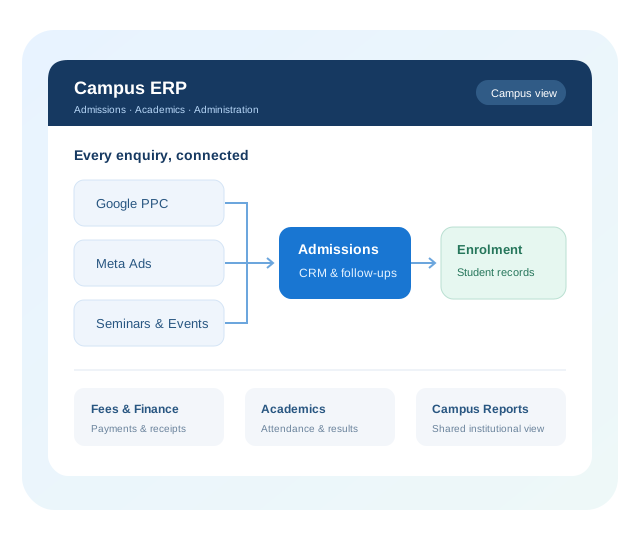
Illustrative admissions CRM and campus ERP workflow
Relevant Digittrix work

Relevant Projects & Delivery Experience

Explore Digittrix’s published attendance and education CRM work. Each case study explains its project scope; campus ERP interfaces shown on this page are illustrative.

Higher education project

IIT Mandi Face-Scanner Attendance

Digittrix worked with IIT Mandi on a face-scanner attendance system, connecting hardware-generated events with central attendance records, administrative monitoring and reporting.

Project workflow: capture, validate, synchronise and review attendance records, with exceptions visible to authorised administrators.

View IIT Mandi project & attendance workflow

Education consultancy CRM

MapMyApplication

Digittrix’s CRM and mobile app connect student enquiries, college records, team tasks and offer letters for an overseas education consultancy.

Explore the CRM case study
2 client video reviews

Client Video Testimonials

Praveen reviews the Plubo learning app; Anuj reviews a web application. These are separate Digittrix engagements, not IIT Mandi or university ERP testimonials.

Children’s learning app

Praveen’s Plubo mathematics app review

Review summary: Praveen names Plubo, his mathematics app for children, and discusses audio/visual coordination, sliding coins, UI/UX improvements and the team’s patience with repeated feedback.

Published
Published by Digittrix on YouTube

Watch video & read transcript

Watch on YouTube

Cross-Industry Delivery Experience

Selected organisations from our wider portfolio. Follow the project and review links for context.

HappyFidos brand logo
Dudar company logo
Swach Bharat mission logo
Amrutam brand logo
Broomy brand logo
Pongo company logo
GoodLives company logo
Zajel company logo
Satyamev Jayate logo
IKEA brand logo
O&M company logo
CarryOn brand logo
Kazo brand logo
Petovac company logo
Higher education software, planned with your team

College ERP Software Development in Mohali

Digittrix develops custom college and university ERP software from its office in Sector 75, Mohali. Your admissions, finance, academics and IT teams can work with us to define one shared student record, departmental approvals and the first modules to launch.

An admissions CRM manages enquiries and applications before enrolment. The ERP manages students, fees, attendance and academic operations after admission. Connecting the two lets an approved applicant become a student record while retaining campaign and counsellor history.

We support institutions in Mohali, Chandigarh and Panchkula from our Mohali office, with online discovery also available. A single-campus college may begin with admissions and fees; a university may need programme rules, department permissions and consolidated multi-campus reporting.

Explore the complete college and university ERP development service for the wider platform scope. This page explains local collaboration and INR project planning.

Local collaboration
Mohali office or online workshops
New build or upgrade
Scope around your existing systems
INR quotation
Defined deliverables and exclusions
Meet the development team

Plan Your Campus ERP with Our Mohali Office

Arrange a requirements discussion with Digittrix Infotech Private Limited. Confirm an appointment before visiting so the right team members can join.

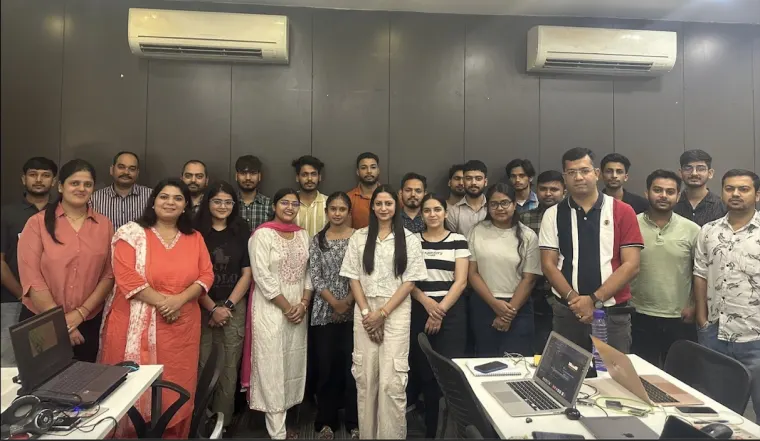
Digittrix team at the office

Digittrix Infotech Private Limited

3rd Floor, Elevate Towers, E 300
Industrial Area, Sector 75
Sahibzada Ajit Singh Nagar (Mohali)
Punjab 140307, India

Bring admissions, finance or IT colleagues to a focused workshop. We can review your current processes, agree a first release and document the questions that affect implementation.

Arrange a Requirements Discussion →
Choose a practical starting point

New ERP, Upgrade or Integration?

The right approach depends on what already works, where teams lose time and which systems you can access.

Build a new ERP

Fits when: spreadsheets or disconnected tools cannot support your academic and administrative workflows.

First release: prioritise a shared student record and the modules needed for one intake or campus.

Check first: data ownership, migration quality, user roles and the capacity to train staff.

Upgrade your existing ERP

Fits when: the core system works but a few modules, reports or interfaces need improvement.

First release: address the highest-impact workflow while retaining usable records and processes.

Check first: source-code or extension access, licences, maintainability and regression testing.

Connect an admissions CRM

Fits when: campus operations work well but enquiries and counsellor follow-ups sit outside the ERP.

First release: capture priority lead sources and hand approved applicants to the student system.

Check first: APIs or authorised exports, record matching, sync ownership and error handling.

An assessment may combine these approaches: retain your ERP, improve one module and connect a new admissions CRM.

Eight connected campus ERP modules

Campus Management Modules for Your First Release

Start with the modules your institution needs first, then extend the platform in phases. Shared student records connect admissions, academics and campus administration.

Swipe to explore all eight modules

College Admission Management Software

Manage programme choices, eligibility checks, documents, interviews and offer letters. Follow each application from enquiry through admission approval and enrolment.

  • Applications & documents
  • Interviews & offers
  • Admission approvals
Plan this campus module
Attendance connected to your campus ERP

College Attendance Management Software & AI Integration

Plan a university attendance management system for students, faculty and staff. Choose online registers, supported biometric devices or AI-assisted capture around your classrooms, campuses and review process.

Online attendance registers

Connect class registers with course schedules, approved absences and correction requests. Teachers record attendance online; authorised teams can identify missing or incomplete entries.

Face-recognition attendance

Use supported cameras or capture devices to match enrolled users and record attendance. Send uncertain matches for review and provide an alternative way to record attendance.

Fingerprint & thumbprint attendance

Connect supported readers to student and staff records. Validate identity mappings and timestamps, and handle repeated scans without creating duplicate attendance events.

Faculty & staff attendance

Connect attendance to teaching schedules, leave and approved HR workflows. Staff and student records can use different rules, permissions and reporting periods.

Review & correction workflows

Give authorised staff a queue for missed scans, uncertain matches and disputed entries. Record who approved a correction and preserve the original event for later review.

Device sync & reporting

Sync supported devices, reconcile offline records and flag missing events. Live updates depend on connectivity and device capabilities; late records remain visible for review.

Connect attendance without losing control of the records

Before integrating biometric devices, agree the data collected, enrolment process, access permissions, retention and correction approvals. For face recognition, test lighting, camera placement and matching quality in a pilot before wider rollout.

Explore our IIT Mandi attendance-management case study for a published institutional project. The options above are scoped to your institution and supported technology.

Know where your next admission starts

Lead Management for Google PPC, Meta Ads & Seminars

Give every enquiry a source, an owner and a next action. Connect online campaigns and offline events to the same admissions pipeline so counsellors can follow up consistently.

Google Ads / PPC

Connect campaign landing-page enquiries to the admissions CRM. Keep available campaign, UTM and click-reference data with the lead, then track qualified applications and enrolments.

Landing pages · Campaign attribution

Meta Ads

Scope Facebook and Instagram instant-form lead capture or website enquiries. Map fields, assign counsellors and flag failed imports through supported account access and integrations.

Lead forms · Counsellor assignment

Seminars & education fairs

Use event-specific QR registration forms, attendance records and validated spreadsheet imports. Keep the seminar, venue, programme interest and follow-up owner on each enquiry.

QR registration · Event follow-ups

Website, referrals & walk-ins

Bring organic enquiries, campus visits, referrals, phone enquiries and manually logged conversations into one queue. Preserve the original source when a prospect returns.

Source history · Duplicate checks

Which sources lead to applications and enrolments?

Compare leads, qualified enquiries, applications, offers and enrolments by campaign, event, programme or campus. Add spend data to calculate cost per qualified lead, application and enrolment. Keep the original source and later touchpoints, link duplicate enquiries to the same prospect, and show attribution gaps using agreed reporting rules.

Campaign capture and conversion feedback are scoped around supported integrations, account permissions and consent settings. Advertising management and media spend are agreed separately. Explore education marketing services.

Admissions CRM & Student Recruitment

Counsellors see each prospect’s history, application stage and next action. Managers can review follow-ups and recruitment progress by programme, intake and campus.

Illustrative seminar workflow

From event registration to student record

A prospective student scans a seminar QR code and selects a programme. Here is how a configured workflow could handle the enquiry:

  1. Capture: record the event, intake and contact preferences; check for an existing enquiry.
  2. Assign: route the enquiry to the programme counsellor and set the next follow-up.
  3. Review: track the application, documents and admission decision.
  4. Enrol: after approval, create or update the ERP student record and retain the original event source.

Google PPC and Meta Ads enquiries can enter the same pipeline with their available campaign data.

College enquiry management

Capture programme interest, intake, campus and contact preferences. Match repeat enquiries to the same prospect so the team can see the full conversation history.

  • Campaign & event sources
  • Prospect matching
  • Programme & intake preferences

Recruitment & marketing automation

Route enquiries by programme or campus and schedule follow-ups and reminders. Respect communication preferences and give counsellors control over exceptions.

  • Counsellor assignment
  • Next action & reminders
  • Conversation history

Applications & enrolment

Track forms, documents, eligibility reviews, interviews and offers through to admission approval.

  • Application stages
  • Document verification
  • Offers & fee confirmation

Connect to the ERP

Move approved applicants into student records while preserving the original enquiry and source history.

  • Approved data handover
  • Duplicate student checks
  • Enrolment reporting
Already have an ERP?

Existing College ERP Upgrades & Integrations

Start with your current software, data and daily difficulties. We assess whether to extend the ERP, connect a new admissions CRM or replace selected modules.

Assess the existing system

Review code or extension access, database structure, licences, hosting, performance and vendor dependencies.

Improve priority workflows

Add admissions CRM, lead integrations, dashboards, mobile access or missing campus modules. Simplify interfaces and repetitive tasks.

Rehearse the migration

Test against representative data, map records and run trial imports. Reconcile student counts, fee balances and payment history.

Plan a controlled rollout

Agree a pilot, acceptance criteria, backup and recovery plan, with cutover scheduled around admissions and examinations.

Useful for your first discussion

Bring your ERP name and version, priority workflows, available source code or API access, sample report formats and the date of your next admission cycle.

Connect the tools you rely on

College ERP & CRM Integrations

Connect your campus platform with learning, finance, identity and communication tools. Agree record ownership, retry handling and visibility when a sync needs attention.

Marketing & admissions

Google Ads landing pages, Meta lead forms, website forms, seminar registrations and permitted conversion feedback.

We plan: Campaign fields, account permissions and lead-to-application matching.

Learning Management System Integration

Connect selected student accounts, course enrolments and academic records with the learning platforms you use.

We plan: Record ownership, sync direction, supported interfaces and failed-update handling.

Payments & accounting

Connect fee collections, receipts and reconciliation to payment providers and supported accounting systems.

We plan: Transaction references, refunds, ledger mapping and duplicate payment callbacks.

Messaging & telephony

Scope email, SMS, WhatsApp and calling-provider connections for reminders and counsellor communication history.

We plan: Consent preferences, approved templates, delivery status and provider charges.

Attendance Devices & Identity

Connect supported face-recognition or fingerprint devices, attendance records and institutional single sign-on with your ERP.

We plan: Device and API compatibility, identity matching, access permissions and attendance correction workflows.

Existing ERP & data tools

Exchange agreed records with the current ERP, reporting tools or authorised spreadsheet imports.

We plan: API or export access, data mapping, retry logs and reconciliation reports.

Migration, Training & Rollout

Our college ERP implementation services cover the agreed migration, access controls and staff handover. Admissions, finance, academics and IT teams validate their workflows before launch.

Reliable migration

Map fields, resolve duplicate students and leads, test sample imports, and reconcile student counts, fee balances and transaction records.

Access by responsibility

Plan campus and department permissions, audit history, export controls, backups, retention and communication preferences.

Staff training & handover

Validate real scenarios with counsellors, faculty and administrators. Agree documentation, deployment access, source-code terms and support.

Scope-based quotations in Indian rupees

College ERP Development Cost in Mohali

There is no single price for a custom campus platform. We quote in INR (₹) after reviewing your modules, users, campuses, existing software and integration needs. Choose a starting scope below for your requirements discussion.

Admissions CRM

Custom INR quotation

For enquiry capture, counsellor assignment, applications and admission tracking.

Cost factors: Google and Meta lead sources, seminar imports, automation rules, campaign reports and the handover to your ERP.

Custom College or University ERP

Custom INR quotation

For connected student records, fees, academics, attendance and selected campus operations.

Cost factors: modules, programme rules, campuses, student and faculty portals, mobile apps, migration and reporting.

ERP Upgrade & Integration

Custom INR quotation

For improvements to an existing system, new modules or connections to other tools.

Cost factors: code and API access, technical condition, device compatibility, data quality and the agreed rollout.

What the written INR proposal includes

Agreed deliverables, exclusions, milestones, acceptance criteria and payment terms. Applicable taxes are stated explicitly. Hosting, messaging, payment gateway fees, hardware, third-party subscriptions and ongoing support are identified separately, with responsibilities agreed before development.

Google Ads and Meta media spend, creative production and campaign management require their own agreed scope. Connecting lead sources to the CRM does not include an advertising budget or guarantee admissions.

Make the first discussion useful

Prepare for Your ERP Planning Workshop

For a college ERP development project in Mohali, a practical workshop starts with your actual workflows. Share anonymised examples rather than live student records during initial discovery.

Map admissions & campus operations

List campuses, programmes, intakes, departments and approval owners. Include enquiry sources, fee rules and the reports your management needs.

Review systems & data access

Bring the current ERP name and version, authorised API or export options, attendance device models and sample report formats. Note vendor permissions or licence restrictions.

Agree a first release & calendar

Prioritise essential workflows with admissions, finance, academics and IT. Plan trial imports, staff training and cutover around your institution’s admission and examination dates.

From workshop to implementation

We document the proposed workflows and integration checks before finalising the INR estimate. The agreed project plan then covers design, development, testing, migration rehearsal, handover and support coverage. Delivery dates depend on the approved scope, access and review cycle.

Plan your next step

College ERP Development in Mohali: FAQs

Answers on ERP development, admissions CRM, attendance integrations, migration, cost and support.

Does Digittrix provide college and university ERP development in Mohali?

Yes. Digittrix Infotech Private Limited develops custom college and university ERP software from Sector 75, Mohali. The agreed scope can include admissions CRM, student records, fees, attendance, examinations, portals and integrations. We can also assess upgrades to an existing ERP.

Can we meet your team at the Mohali office?

Yes, by confirmed appointment. Our office is on the 3rd Floor, Elevate Towers, E 300, Industrial Area, Sector 75, Sahibzada Ajit Singh Nagar, Punjab 140307. Call +91 87270 00867 or email hello@digittrix.com to arrange a requirements discussion. Online workshops are also available.

Do you work with institutions in Chandigarh and Panchkula?

We support institutions in Mohali, Chandigarh and Panchkula from our Mohali office. Discovery and reviews can take place online or through an agreed office meeting. Any campus visit, travel or onsite training is confirmed in the project scope.

How much does college ERP software development cost in INR?

We provide scope-based INR quotations after reviewing modules, campuses, users, integrations, data migration and web or mobile requirements. The written proposal specifies deliverables, exclusions, milestones, payment terms and applicable taxes. Hosting, hardware, third-party charges and support are identified separately.

Can an admissions CRM manage Google PPC, Meta Ads and seminar leads?

Yes. We can scope landing-page enquiries, supported Meta lead forms, seminar QR registrations and validated imports into one student lead management workflow. Counsellors can track sources, follow-ups and application stages. Integrations depend on account permissions and supported interfaces; advertising management and media spend are agreed separately.

Can you upgrade our current ERP instead of replacing it?

We first review the product and version, source-code or extension access, licences, database and available APIs. The assessment determines whether to improve existing modules, add an admissions CRM, connect other tools or replace selected components. Compatibility must be checked before committing to an integration.

Can you connect face recognition or fingerprint attendance devices?

We can assess supported device APIs or SDKs, identity mapping and offline synchronisation. Face-recognition workflows need a pilot covering camera conditions, uncertain matches and correction approvals, with an alternative attendance method. The IIT Mandi case study describes Digittrix’s published face-scanner attendance project; it does not imply that every proposed ERP module was part of that engagement.

What should our team prepare for the first ERP discussion?

Bring your campuses, programmes, intakes, priority workflows, current ERP name and version, integration options and anonymised report examples. Include representatives from admissions, finance, academics and IT where possible. Your admission and examination calendar helps define a practical first release and cutover window.

Do you handle migration, staff training and ongoing support?

These services are defined in the proposal. Migration planning can include authorised exports, trial imports, duplicate resolution and reconciliation of student counts and fee balances. We agree acceptance checks, training, documentation, access handover and support coverage before launch.

Can a university ERP support multiple campuses and mobile portals?

Yes, where included in the agreed scope. Shared student records can connect programme and campus reporting while retaining departmental permissions and local approvals. Student and faculty web portals or mobile apps are planned around the workflows and access each role needs.

Plan your next admission cycle

Discuss Your College ERP with Our Mohali Team

Share your existing software, admission sources and priority modules. Meet at our Sector 75 office by appointment or start online, then receive a proposal in INR for the agreed scope.

Plan Your Mohali ERP Project