
 +64 22 003 5555

Help shoppers find products
A conversation may begin with “Do you sell this?” Showing catalogue results inside the widget gives the shopper a way to explore products while using the support interface.

Shopify product case study · built by Digittrix
Help shoppers find a product, find an answer or start a conversation.
The project: Digittrix developed Talksy, a Shopify app that brings live chat, store search and FAQs into one support widget. This case study walks through the published product and explains what merchants can learn from its approach when planning their own store experience.
Published product images
These images come from Talksy’s product materials and Shopify listing. They show demonstration content rather than a client’s private store records. Open each image to inspect the interface.
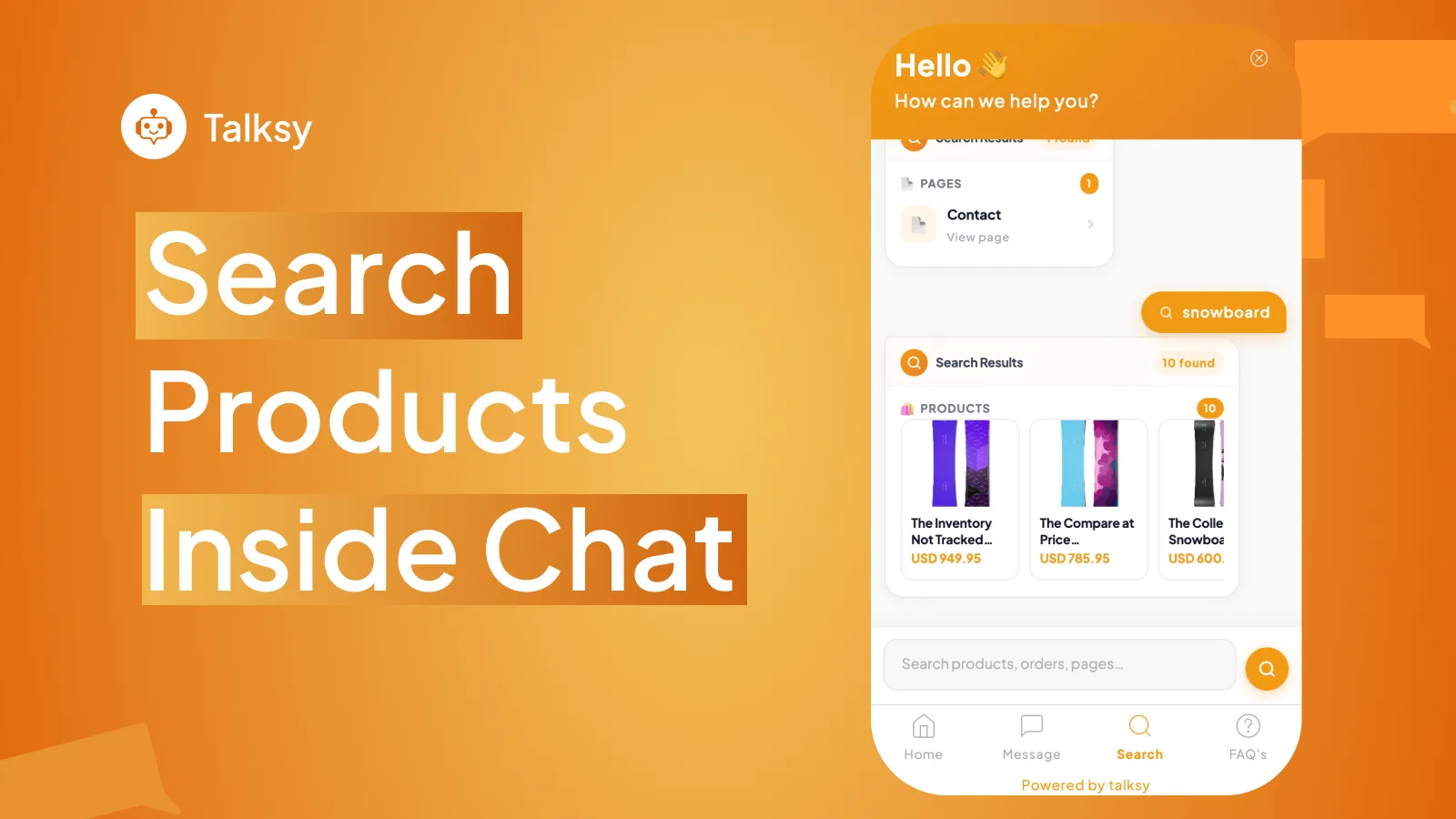
The search view presents product cards within the widget. A useful search result gives the shopper enough context to decide which product to explore next.
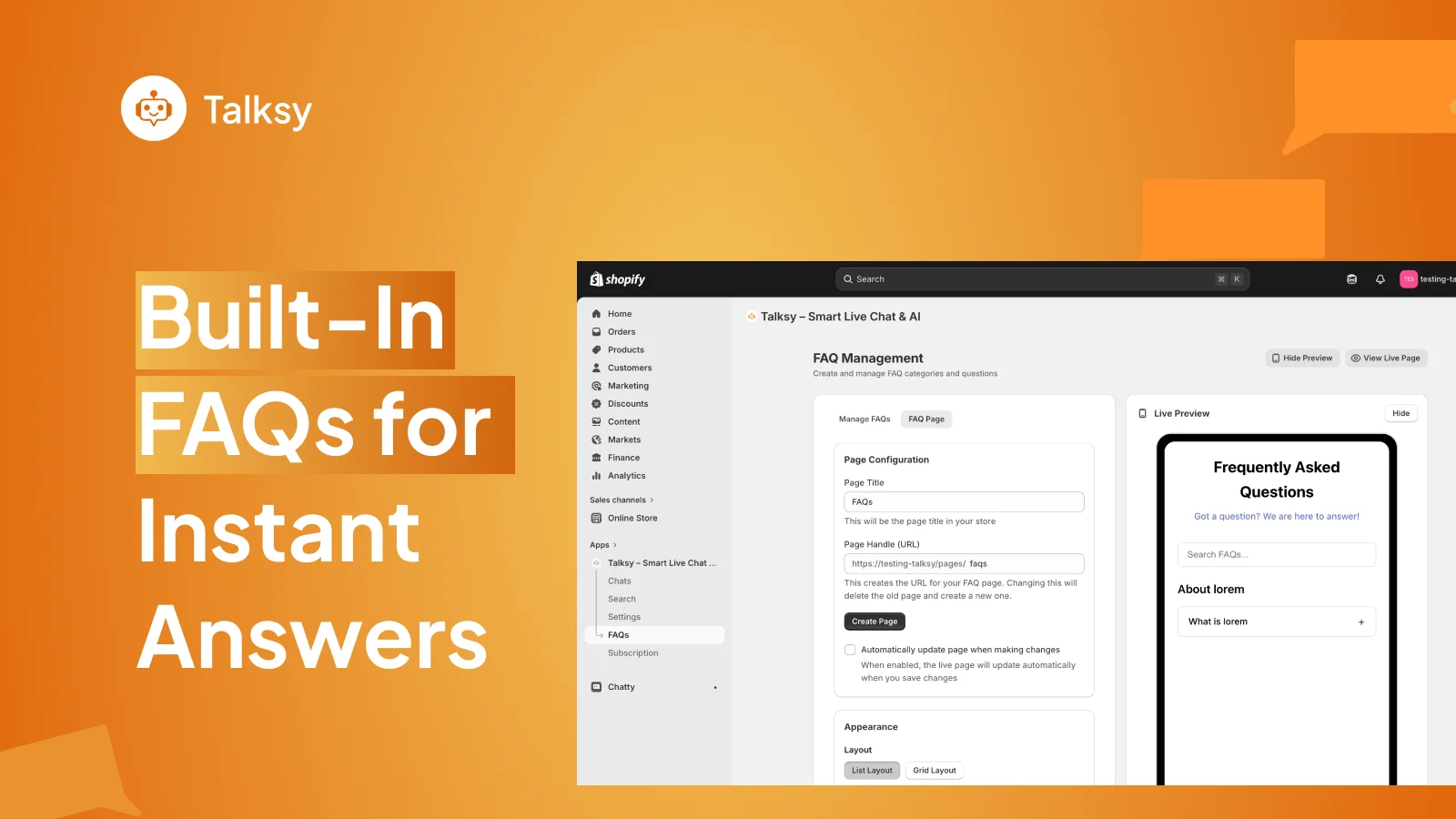
The published FAQ screen shows page configuration and a live preview. The sample question is placeholder content: a merchant needs to supply accurate answers for their own store.
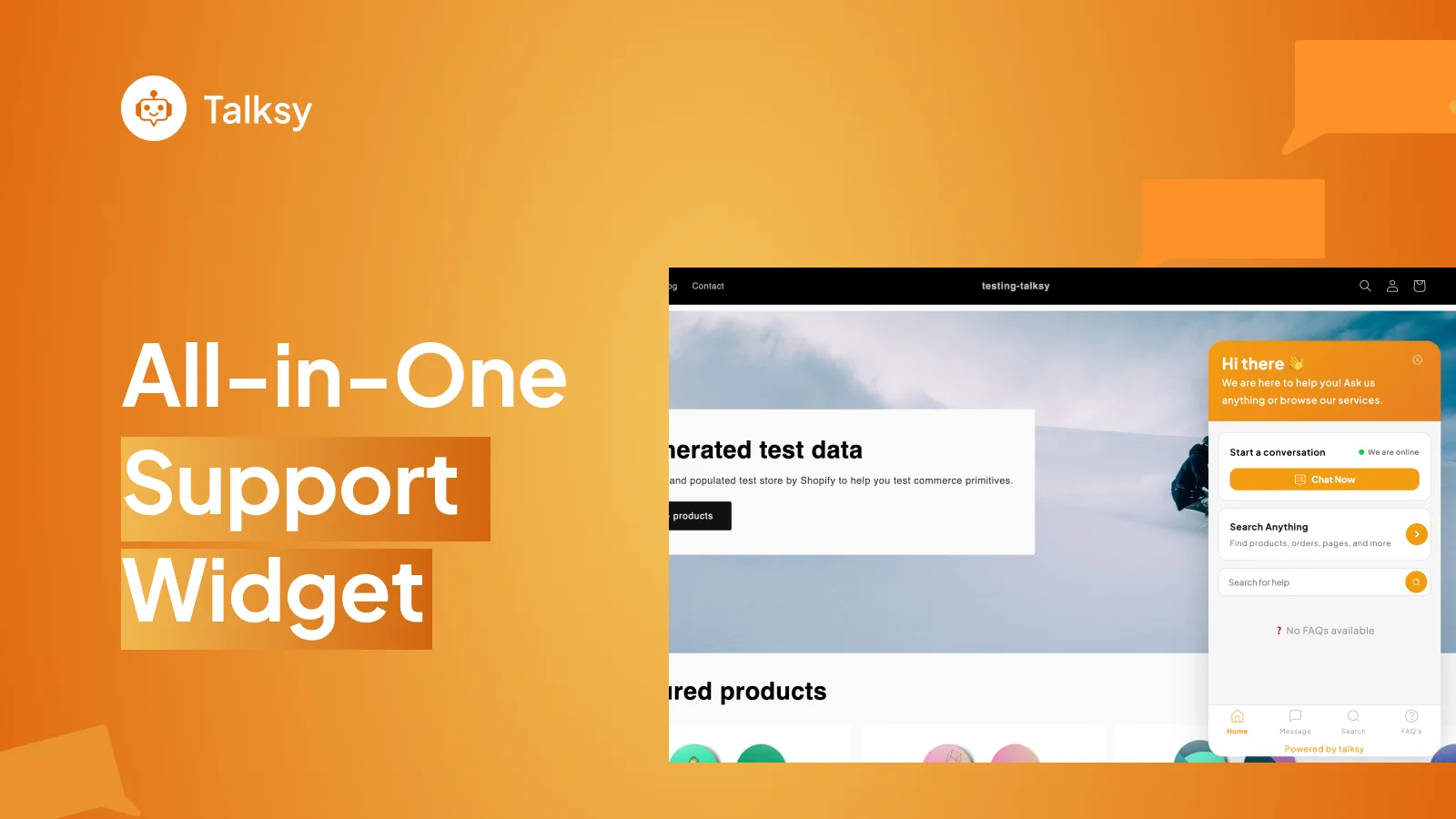
The widget brings conversation and search entry points into the storefront. This demonstration screen also shows an empty FAQ state, which highlights why setup matters before launch.
The merchant problem
Someone who knows a product name needs search. Someone checking a delivery policy needs an answer. Someone with a specific concern may need a person. A support experience has to make each route easy to recognise.
A conversation may begin with “Do you sell this?” Showing catalogue results inside the widget gives the shopper a way to explore products while using the support interface.
Questions about delivery, returns or product care often need consistent store information. FAQs give merchants a place to publish those answers and keep them current.
A written answer cannot cover every situation. Live chat gives shoppers a way to ask a more specific question when a support agent is available.
What Digittrix delivered
The official Shopify listing identifies Digittrix as the developer. It documents the following capabilities; individual plan limits and notification timing should be checked on the current listing.
A storefront conversation connects shoppers with the support team. Merchants should pair this feature with clear operating hours and a process for questions that arrive when nobody is available.
Shoppers can look for products within the widget. The published search screen shows a query, result count and product cards, including product names and prices.
Merchants can organise common answers and present them to shoppers. The administration screenshot shows page settings and a preview of the customer-facing FAQ experience.
The listing includes browser and email notifications and widget customisation. Email delivery intervals vary by plan, so merchants should confirm the expected timing before choosing a subscription.
Product workflow
Use these four tasks when reviewing the product for your store. They describe the published experience and a suggested evaluation approach, rather than a recorded usability study.
Check whether chat, search and FAQs are easy to find on the storefront. Try the same entry point on a phone.
Search for a known product and a broader category. Review whether the results and product labels make the next action clear.
Look for a common store question. Check whether the answer matches the current policy and gives the shopper a useful next step.
Check the route to a person and the message expectations. Confirm notification settings with the team responsible for replying.
Lessons for your next Shopify project
Talksy illustrates how several shopper needs can share one entry point. These are practical planning takeaways from the product, not claims about measured revenue or conversion gains.
Write down when a shopper should search, read an answer or contact a person. Then check that each route has a clear next step. A feature list alone does not describe the full customer journey.
A search tool relies on useful catalogue information. An FAQ tool relies on accurate answers. Assign someone to maintain product names, policies and support content as the store changes.
Review what shoppers see when search finds nothing, an FAQ section has no content or an agent cannot reply. These situations deserve the same attention as the ideal journey.
Before judging an installation, choose a baseline: unanswered questions, time to first reply or searches that lead to a product visit. Compare equivalent periods and account for changes in traffic, promotions and staffing.
Evidence note
The public listing confirms the app, its developer and the advertised capabilities. The images show product interfaces with demonstration data. This article does not report a private client’s analytics, a measured before-and-after result or an independently tested response time.
The walkthrough and planning lessons explain how to evaluate this type of experience. They do not describe unverified internal architecture, delivery timelines or engineering incidents. Check the current listing for availability, compatibility and subscription terms.
Source trail
Use the official listing to verify the product and the links below to explore its features and development options.
Developer attribution, published features, plans and product gallery. Checked 7 November 2026.
Digittrix’s overview of the live chat, store search and FAQ product.
Common questions
Digittrix Infotech Pvt Ltd. developed Talksy. The official Shopify App Store listing names Digittrix as the developer.
Talksy is a Shopify app. Its storefront widget provides chat, search and FAQs alongside the store’s theme. A theme controls the broader page layout and visual presentation.
This case study documents live agent chat, store search and FAQs. It does not establish an autonomous AI chatbot or describe a language model.
No sales increase is promised here. This case study documents the delivered features. A merchant needs store-specific measurements to assess the effect on support, product discovery or purchases.
Use the official Talksy listing on the Shopify App Store for current plans, installation options and feature limits. App subscription fees are separate from the cost of commissioning a custom Shopify app.
Build with context
Start with the task you want to improve, the people who will use it and the systems it must connect. Our team in Mohali works with businesses worldwide and scopes the app around those requirements.