 +91-8727000867
 +64 22 003 5555


Construction Software Cost: Build, Buy or Integrate?
Compare a company website, a focused site workflow and a custom platform phase without confusing starting development budgets with a complete enterprise rollout.
The planning answer
Configure an existing product when its workflow, exports and access controls fit. Integrate tools when the main problem is a missing handoff. Consider a custom release when an important process cannot be supported practically by available products. Compare implementation and ongoing ownership together, using the same requirements for each option.
Download planning worksheet · See the tested prototype screenshot · Read the actual test report
Choose the approach before comparing quotes
Write down the hardest realistic scenarios before choosing. Test a partial delivery, a returned approval, a failed synchronization and a user opening another project. A feature list alone will not show whether the product handles your operating rules.
| Approach | When it can fit | Questions to resolve |
|---|---|---|
| Configure existing software | Standard workflows already meet most requirements. | Subscriptions, user limits, export access and configuration effort. |
| Integrate current tools | Each system works, but records are re-entered between them. | API access, record ownership, retries and reconciliation. |
| Add a focused custom workflow | A specific approval, field or client experience is missing. | Roles, interfaces, boundaries and acceptance criteria. |
| Build a broader platform in phases | Several connected workflows need a shared operating model. | Migration, dependencies, support ownership and phased rollout. |
Digittrix’s starting development budgets
These are Digittrix’s published development budgets for an agreed scope, not market averages or a promise that all construction features are included. The integrated-platform figure is a starting budget for selected workflows in a scoped release; it does not describe an unlimited enterprise replacement.
Website pages, web portals, Android/iOS interfaces, user roles, offline behaviour, migration, integrations, support and acceptance checks are confirmed in the proposal. No standard support period or combination of interfaces should be inferred from these prices.
The timeline begins after scope, designs, content and required access are approved. Feedback delays, scope changes and integration dependencies can change delivery. App-store review time is separate where mobile apps are included.
Construction company website
USD 1,499 · 2–3 weeks
Agreed service pages, project portfolio, CMS and enquiry forms. Page count, content and any CRM connection are confirmed in the proposal.
Site app / client portal MVP
USD 1,500–2,499 · 4–6 weeks
A focused release for agreed site reports, tasks, photos, approvals or client updates. Confirm user roles, website/app interfaces and offline requirements before development.
Integrated construction platform
USD 2,500+ · 8 weeks+
Starting budget for selected project dashboards, BOQ, procurement or business-system connections. The proposal defines modules, interfaces, migration and integration scope.
What changes development effort?
Illustrative scope comparison: a single-project report-and-approval workflow differs from a multi-company procurement platform with accounting synchronization. Both may have a “dashboard,” but the records, permissions and failure cases are different. Neither example defines a standard package inclusion.
- Interfaces and users: a public website, browser-based portal and native field app require different journeys and testing.
- Approval complexity: thresholds, delegation, amendments and role separation create different rules.
- Offline work: draft recovery, attachments, expiry and conflict handling need explicit scope.
- Integrations: each external system adds access, mapping, error handling and reconciliation work.
- Migration: historic records, inconsistent units and duplicate supplier IDs can require cleanup before import.
- Reporting: simple record lists differ from agreed financial calculations or cross-project dashboards.
- Rollout: supported devices, staff training, pilot participation and acceptance criteria affect the plan.
Compare the operating budget as well as the build
Use a consistent planning equation: total ownership budget = implementation + migration and onboarding + recurring services + usage charges + agreed maintenance and future changes. Include applicable taxes and provider charges in the commercial review. This is a budgeting framework, not a savings forecast.
For a subscription product, check user or project tiers, storage, API access, export fees and contract terms. For custom software, identify who owns hosting accounts and who handles monitoring, backups, dependency updates and incident response. Custom development does not eliminate all recurring costs.
Hosting, storage, messaging, app-store accounts and third-party licences are itemized separately where applicable. Confirm support hours, channels, response arrangements and what counts as a defect versus a new feature in the agreement.
Plan a measurable pilot before wider rollout
Start with one agreed team, project and workflow. Inventory current records, map identifiers, trial an import and reconcile counts and quantities. Keep the existing records available until the team signs off the migration.
Agree pilot checks such as accurate imported balances, successful retries, blocked unauthorized actions and staff being able to identify unsent records. Record defects and assign an owner before deciding to expand. Keep a fallback and reconciliation process for interrupted cutover.
The pilot is proposed delivery work to scope with the client. Digittrix’s public construction demonstration is prototype evidence with fictional records, not proof of a completed construction pilot or a measured return on investment.
Bring a comparable brief to each supplier
Ask each supplier to identify assumptions, exclusions and dependencies against the same brief. Keep the next phase separate so a starting price cannot be mistaken for the cost of every future feature.
- Your current tools, sample forms and the workflow causing repeated work.
- People, projects and interfaces needed for the first release.
- Records to import and known data-quality problems.
- Required connections and who can arrange provider access.
- Offline, retention and access-control needs.
- Acceptance criteria, ownership expectations and support requirements.
Build, buy or integrate comparison worksheet
Compare supplier evidence for interfaces, users, offline behaviour, migration, API access, one-time and recurring costs, support and ownership. Record currency and period beside each amount. Blank cells mean unknown; the worksheet does not calculate or promise a quote.
Download Worksheet (XLSX)Screenshot from the tested prototype
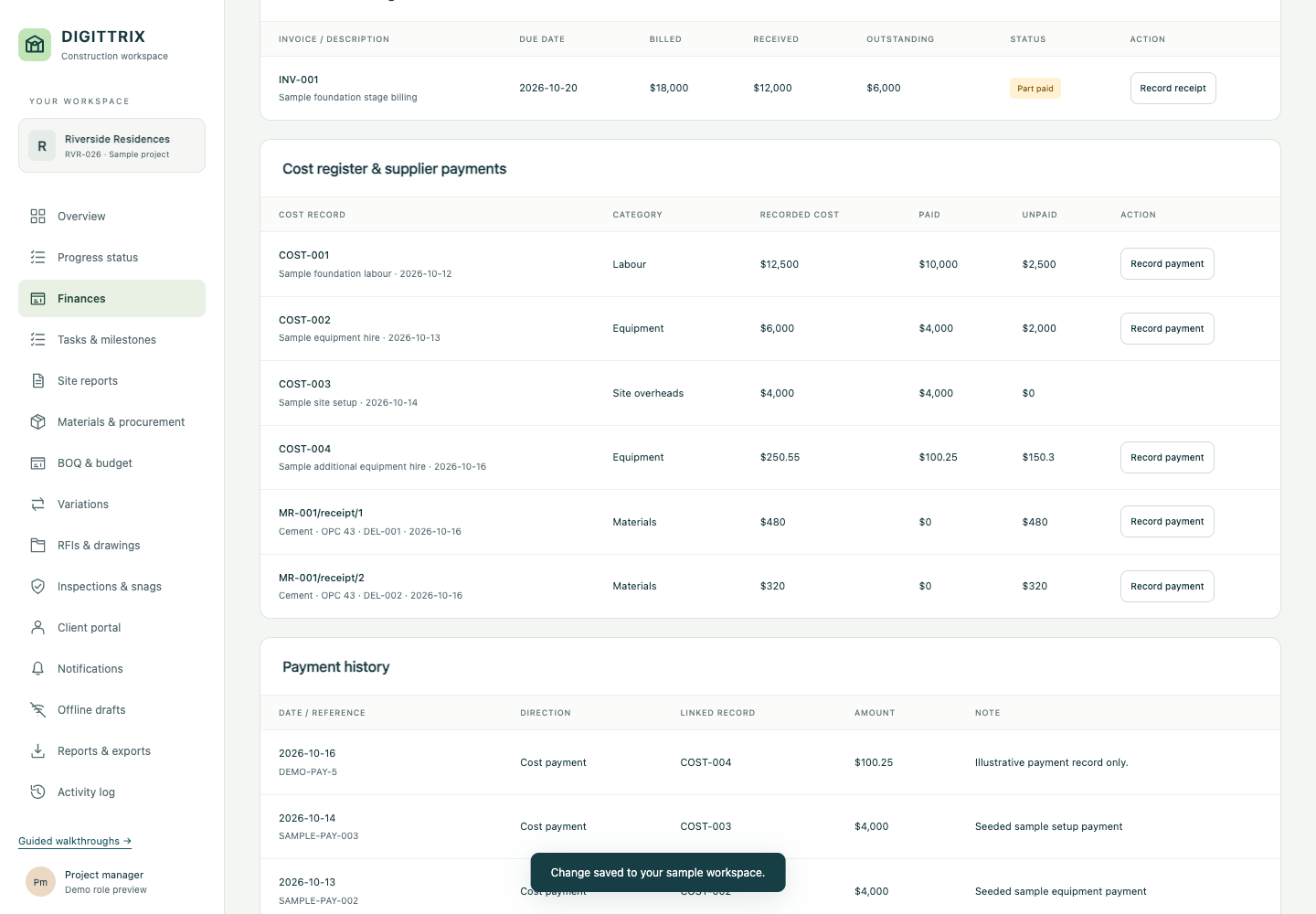
- A payment changes the paid and unpaid balances without increasing the recorded cost a second time.
- The browser form rejected a USD 151 payment against the remaining USD 150.30.
- Use this example to discuss workflow scope. Development interfaces, integrations, support and pricing stay proposal-specific.
Continue planning
- Offline Construction Site Reporting: Scope, Sync & Testing
- Construction Material Approval Workflow: Request to Receipt
- Construction website and app development services
Share your current records, tools and first-release goals. Interfaces, integrations, migration, support and pricing are confirmed for the agreed proposal.
Discuss Your Construction Project