 +91-8727000867
 +64 22 003 5555


Construction Material Approval Workflow: Request to Receipt
Use a concrete material-request example to agree responsibilities, quantities, exceptions and the records that should move between your site and accounting tools.
The planning answer
Separate a material request, approval, purchase order, delivery receipt and payment record. A request does not authorize a purchase, and a delivery does not establish payment. Link each stage to the project and preceding record, keep changes visible and reconcile accepted quantities before closing an order.
Download planning worksheet · See the tested prototype screenshot · Read the actual test report
Agree ownership before configuring screens
Name the person who requests materials, the person who approves scope or spend, the buyer who orders and the receiver who checks delivery. Decide who can return a request, amend an order, record damage or correct an accepted receipt. A user may hold more than one role, but the approval policy should make those responsibilities explicit.
Choose the system that owns each record. For example, the site app may own requests while an accounting or procurement system owns purchase orders. Record the shared project ID, supplier ID, material code and unit mapping. Do not let two systems independently edit the same approved quantity without a conflict rule.
Worked example: 120 requested, 100 approved
This is the fictional workflow illustrated in Digittrix’s desktop prototype recording. It describes implementation evidence using sample records, not a completed client construction project or a claimed business improvement.
| Stage | Fictional event | Record and control |
|---|---|---|
| Request | Site supervisor requests 120 cement bags. | Project, work area, specification, unit, purpose and needed-by date. |
| Return and revision | Manager returns it; supervisor revises to 100 bags. | Original version, reason and revised submission remain linked. |
| Approval | Manager approves 100 bags. | Approver, date and approved version recorded. |
| Order | Procurement orders 100 bags. | Supplier and order reference linked to that approval. |
| First receipt | Receiver accepts 60 bags. | Delivery reference, accepted quantity and 40 outstanding. |
| Final receipt | Receiver accepts another 40 bags. | 100 accepted in total, zero outstanding. |
| Closure | Manager closes the completed order. | Reconciliation retained; invoice and payment controls stay separate. |
Handle exceptions without losing the history
For this example, outstanding quantity is ordered quantity minus accepted receipts, provided no order amendment or return changes the balance. Available stock also depends on issues, transfers, returns and adjustments. These are different measures and should have distinct labels.
- Damaged goods: record accepted and rejected quantities separately; rejected goods do not become usable stock.
- Over-delivery: decide whether receiving is blocked, held for review or accepted under a separately approved amendment.
- Unit mismatch: a bag, pallet and tonne cannot be exchanged without an agreed conversion and material specification.
- Duplicate delivery reference: detect retries and repeated entry before they increase stock twice.
- Quantity changes after approval: create an amendment and repeat the required review instead of rewriting the original approval.
- Receipt correction: record who corrected it and why, with a visible adjustment rather than an unexplained deletion.
Plan the accounting handoff
Define the event that should leave the site workflow: an approved request, a released purchase order or an accepted receipt. Map mandatory fields, ownership and the status to return. A successful API request is not enough; users need the external record reference and a way to reconcile missing or rejected entries.
An illustrative handoff sends an approved purchase order to the agreed finance system, then returns its external reference to the site workspace. Supplier invoice matching and payment approval follow the finance team’s separate rules. Do not infer that accepting 100 bags also authorizes or completes a payment.
If your existing tools include Procore, Autodesk Construction Cloud or an accounting platform, feasibility depends on the relevant API, account entitlements, permissions and available records. A discovery review must establish that access. The prototype does not demonstrate a live connection to these products.
Specify acceptance checks before development
Use the same examples during a trial import and pilot. Confirm starting balances, test records and who signs off the result. A tidy dashboard is not sufficient evidence that quantities reconcile correctly.
| Check | Expected behaviour |
|---|---|
| Unapproved request sent to ordering | Blocked or routed through the agreed approval step. |
| Repeated receipt upload | No duplicate accepted quantity. |
| Second receipt completes the order | Outstanding balance becomes zero. |
| User accesses another project | Server enforces the project access policy. |
| External system unavailable | Record stays pending or failed, with a recoverable retry path. |
| Reconciliation and export | References and quantities match the accepted records. |
Turn the workflow into a first-release brief
Bring sample request, order and delivery-note formats with sensitive information removed. List roles, approval limits, required attachments, unit rules, exceptions and the system of record. Identify the first site or team that will trial the workflow.
Choose which stages belong in the initial release. Integration, offline capture, migration, support and native mobile interfaces remain proposal-specific. The public videos and screenshots can support this discussion; the live interactive prototype is admin-only.
Material approval scope worksheet
Define required fields, quantities, units, record ownership, approval rules, exception handling and acceptance evidence. Fill the blank requirements and owner columns for your project before scoping the release.
Download Worksheet (XLSX)Screenshot from the tested prototype
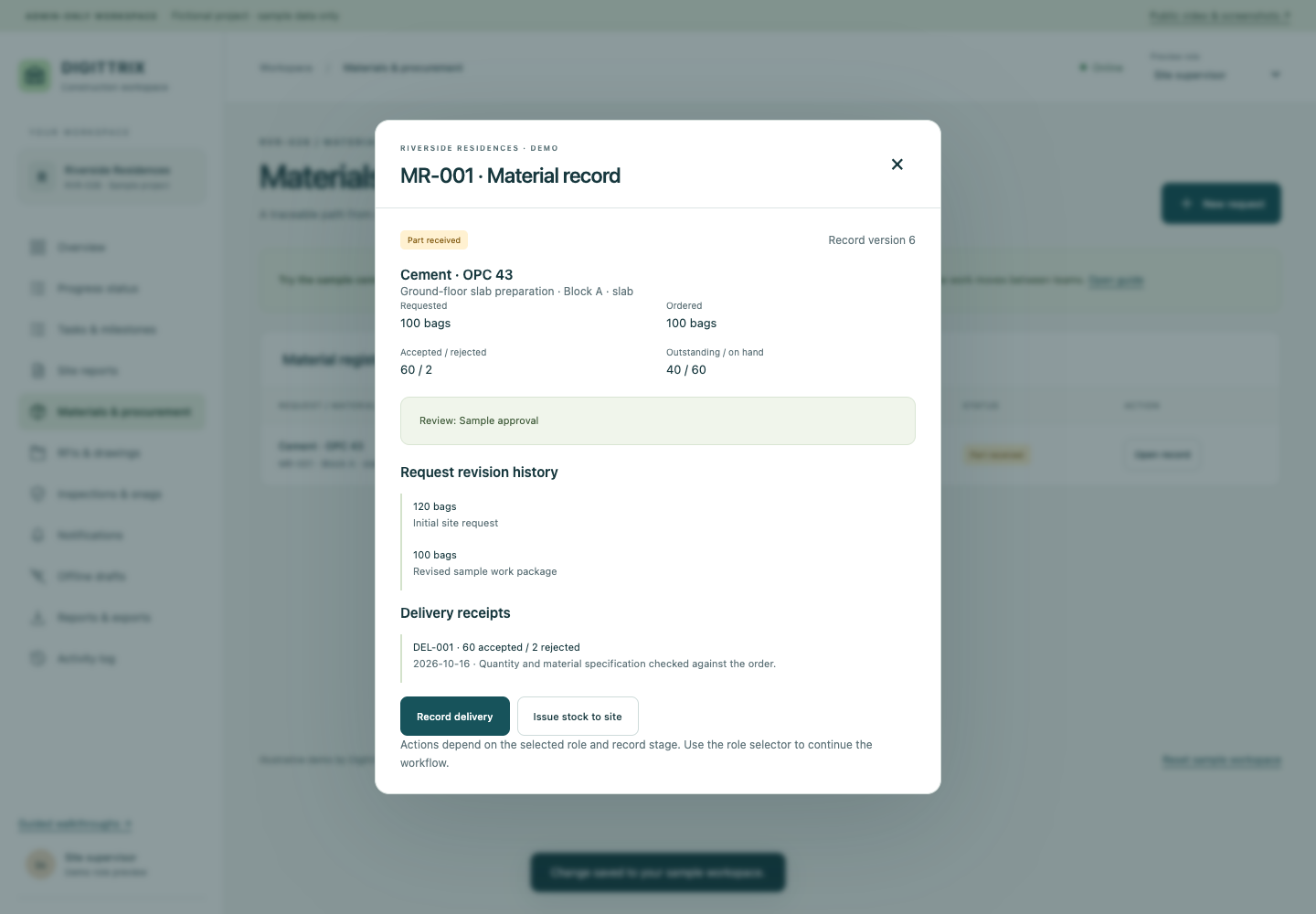
- Accepted and rejected quantities are separate; rejected bags do not increase accepted stock.
- Outstanding is 100 ordered minus 60 accepted at this point.
- The original request and revised quantity remain visible in the history.
Technical references
Check provider documentation and account access when confirming your implementation scope.
Continue planning
- Offline Construction Site Reporting: Scope, Sync & Testing
- Construction Software Cost: Build, Buy or Integrate?
- Construction website and app development services
Share your current records, tools and first-release goals. Interfaces, integrations, migration, support and pricing are confirmed for the agreed proposal.
Discuss Your Construction Project