 +91-8727000867
 +64 22 003 5555


Offline Construction Site Reporting: Scope, Sync & Testing
Decide what a site team can record without a connection, what must wait for the server and how to test the handoff before rollout.
The planning answer
Offline reporting should save an agreed draft on the device, show whether it has reached the server and preserve a clear review history. Treat capture, upload and approval as separate states. Decide which devices and browsers must work, how attachments are retained and who resolves conflicting edits before choosing the implementation.
Download planning worksheet · See the tested prototype screenshot · Read the actual test report
Define the smallest useful offline workflow
Start with a task a supervisor must complete when connectivity drops: record work completed, labour counts, an issue and an optional site attachment. List the project records they need to read as well as the records they create. A cached dashboard alone does not establish offline reporting capability.
Agree whether users must open the app and sign in while connected before visiting a site. Define the supported devices, browser or installed-app versions, expected connection gaps and permitted data on a shared device. Native apps and mobile web apps can have different storage and background-execution behaviour; test the selected implementation rather than assuming equivalence.
Show the state of each report
A connection indicator is a hint, not proof that the application server accepted a report. MDN documents that navigator.onLine can report a network connection even when internet access is unavailable. Keep the server acknowledgement visible separately.
| State | What it means | What the user should see |
|---|---|---|
| Local draft | The record is saved only on this device. | A clear local status and a way to edit or discard it. |
| Pending upload | Submission is queued but the server has not confirmed receipt. | A pending marker, retry action and any attachment status. |
| Submitted | The server accepted a specific report version. | A server reference and submission confirmation. |
| Returned / approved | An authorized reviewer made a recorded decision. | The decision, reviewer, reason and next permitted action. |
A worked example: interrupted report submission
Illustrative scenario: a supervisor records 18 workers and slab-preparation notes on a fictional project. Connectivity drops during upload. The record stays pending; it is not shown to the client as an approved update.
After reconnecting, the app retries the same submission with a stable request identifier. If the first attempt reached the server but its response was lost, the server should return the existing result rather than create a second report. If the underlying project or record changed, show the conflict for review instead of silently replacing an accepted version.
Keep attachment upload status separate from report text. A report should not appear complete if an attachment required by the agreed workflow failed to upload. Choose whether submission is blocked or explicitly marked incomplete; document that choice in the acceptance criteria.
Plan storage, expiry and recovery
Background synchronization is not universally supported across browsers. Provide an explicit retry or synchronization path and test the target environment. Do not make the workflow depend entirely on a background feature being available.
- Record what can remain on the device, for how long and what logout does to unsent drafts.
- Set practical limits for attachment size, queued records and storage. Explain how the user handles a full device.
- Decide what happens after a session expires, a password changes or project access is removed while the device is offline.
- Require server-side permission checks when a queued action arrives; previously cached access is not a permanent authorization.
- Define recovery after app closure, device restart or browser storage clearing. Do not promise recovery from deleted local storage.
Use these acceptance checks in a field pilot
Test with representative staff, devices and network conditions on one agreed project before expanding. Keep a reconciliation log: local drafts, received records, rejected actions and unresolved attachments. The pilot passes when the agreed checks pass and users can recognize pending work without guessing.
| Scenario | Expected result to agree |
|---|---|
| Connection lost before upload | Draft remains recoverable on the supported device. |
| Response lost after server acceptance | Retry produces one report, not duplicates. |
| Attachment fails | The report shows an incomplete or retry state. |
| Two people edit the same record | A defined conflict rule protects accepted versions. |
| Access revoked before reconnect | The server rejects the action and explains the next step. |
| App closed with unsent work | Documented recovery behaviour matches the tested platform. |
What the Digittrix prototype establishes
Our public evidence page shows recordings and screenshots made with fictional Riverside Residences data. The mobile recording demonstrates navigation, progress, finance screens and a site-report submission. It does not show an independently verified offline field deployment or establish native Android/iOS delivery.
The interactive prototype remains restricted to Digittrix administrators. Contact the team for a guided walkthrough. Offline requirements, supported interfaces, data handling and acceptance checks belong in your project proposal; they are not automatically included in a starting price.
Offline reporting test worksheet
Record the device, OS, browser/app version, actual observation, evidence, tester and date for each scenario. All result fields start as Not run. Complete a separate copy for each environment; this planning template is not our completed test report.
Download Worksheet (XLSX)Screenshot from the tested prototype
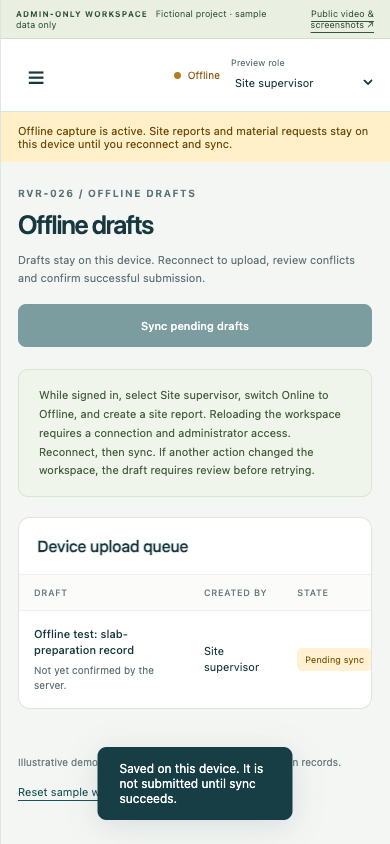
- The Offline indicator reflects browser network disconnection during this test, not just the demo simulation switch.
- Pending sync means the server has not confirmed submission.
- The test used desktop Chrome with a mobile viewport, not a physical phone or a construction site.
Technical references
Check provider documentation and account access when confirming your implementation scope.
Continue planning
- Construction Material Approval Workflow: Request to Receipt
- Construction Software Cost: Build, Buy or Integrate?
- Construction website and app development services
Share your current records, tools and first-release goals. Interfaces, integrations, migration, support and pricing are confirmed for the agreed proposal.
Discuss Your Construction Project