
 +64 22 003 5555


Highlights
- 70% of wellness plans can be personalized around user goals, routines, activity, and preferences.
- 65% of smart tracking features can turn wellness data into timely sleep and exercise suggestions.
- 80% of users can gain confidence from strong privacy controls for personal wellness data.

Co-Founder
Vandana Abrol 
An enthusiastic developer and skilled business management expert with over a decade of experience in the field
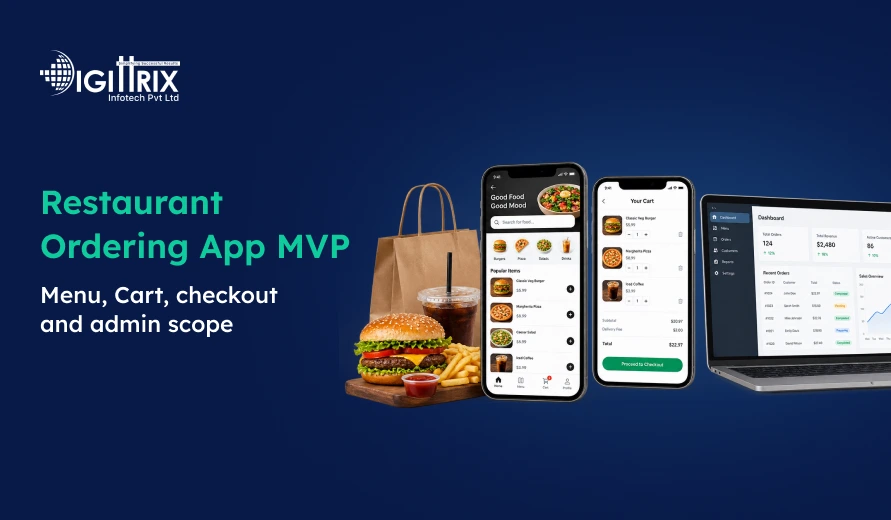
A restaurant needs a simple way to manage online orders while giving customers an easy ordering experience. A custom restaurant ordering app can connect the menu, cart, checkout, payments, order status, and admin operations in one system. For restaurants, cafés, cloud kitchens, and food businesses, starting with an MVP can help define the main ordering workflow before adding more functions.
A restaurant ordering MVP can include customer ordering, menu management, cart and checkout, pickup or delivery, payment processing, notifications, and essential admin controls. The exact scope depends on how the restaurant accepts orders and manages its daily operations.
Looking for the right food delivery platform? Check Digittrix's food delivery platform guide to understand the key factors for choosing the right solution in India!
What Is a Restaurant Ordering App MVP?
A restaurant ordering MVP is the first working version of an ordering platform with the main features needed to accept and manage customer orders.
The basic flow can include:
- Customer views the menu
- Customer selects food items
- Items are added to the cart
- Customer reviews the order
- Customer selects pickup or delivery
- Customer completes checkout
- Restaurant receives the order
- Order status is updated
- Customer receives order notifications
A custom restaurant ordering app can be designed around the restaurant's menu, ordering process, payment setup, and operational requirements.
The MVP can be developed for a single restaurant, café, cloud kitchen, or early-stage food ordering business. As the business grows, additional functions can be added according to its requirements.
 Build a Custom Restaurant Ordering App for Your Business
Planning a restaurant ordering app? Talk to Digittrix about your MVP, menu, cart, checkout, payments, and admin features.
Menu Management in a Restaurant Ordering App
The menu is one of the main parts of any restaurant ordering platform. Customers need to see available items, prices, options, and other information before placing an order.
A restaurant admin should be able to manage the menu from the dashboard.
Menu Items
The admin can add and update food items with their names, descriptions, prices, and availability.
This allows customers to see the current menu through the ordering platform.
Item Modifiers
Some food items require customers to select additional options. For example, a customer may need to choose a size, add-ons, or other available options.
The menu system can support modifiers so customers can make their selections before adding an item to the cart.
Price Updates
Restaurant prices can change over time. Admin users can update item prices through the menu management system.
For restaurants with different outlets, menus can also be managed according to the requirements of each location.
Item Availability
The menu can show whether an item is available for ordering. When an item is sold out, its availability can be updated so customers do not place orders for unavailable products.
This is an important part of Restaurant App Development because menu and stock availability can affect the complete ordering process.
Cart Management
The cart connects the menu with checkout. After customers select their food items, they need to review the order before making payment.
A restaurant ordering MVP can include:
- Selected food items
- Item quantities
- Modifiers
- Item prices
- Order subtotal
- Applicable charges
- Total amount
- Option to update quantities
- Option to remove items
A clear cart helps customers check their order before moving to checkout.
For a custom restaurant ordering app, the cart rules can be planned around the restaurant's pricing and ordering requirements.
Checkout Scope
Checkout is the final stage before an order is placed. The process should collect the information needed to complete the order.
Customer Information
The checkout can collect basic customer details such as name, phone number, and other required information.
Pickup or Delivery
Restaurants can allow customers to choose between pickup and delivery when both services are available.
For delivery orders, the required address and delivery information can be collected during checkout.
Payment
The checkout can connect to supported payment gateways so customers can complete their payment.
The Digittrix restaurant app development page lists integrations such as Stripe, Razorpay, PayPal, and Cashfree. The payment provider used for a project depends on the target market and business requirements.
Order Confirmation
After successful checkout, the customer can receive an order confirmation with the relevant order details.
The restaurant can then process the order through its operational dashboard.
Admin Scope for a Restaurant Ordering MVP
The admin dashboard gives restaurant staff control over the ordering system. The exact dashboard depends on the size and operating model of the restaurant.
Order Management
Admins can view incoming orders and their current status.
The order workflow can include stages such as:
- Order received
- Order accepted
- Preparing
- Ready
- Pickup
- Delivery
The exact status flow can be adjusted to match the restaurant's process.
Menu Management
Admin users can add, edit, or remove menu items and manage prices, modifiers, and availability.
For restaurants with multiple outlets, the system can also support outlet-specific menus where required.
Customer Management
The admin can access customer and order information needed to manage the ordering process.
This can help the restaurant review previous orders and handle customer-related requests.
Refund Management
Where supported by the payment setup, the admin workflow can include refund requests and payment records connected with orders.
Staff Permissions
An admin dashboard can use role-based access so different staff members receive access to the functions they need.
For example, staff handling orders may not need access to all administrative settings.
Reports
The restaurant can use operational reports to review order activity and other information available through the system.
The reporting scope should be defined according to the restaurant's actual requirements.
 7-Day Risk Free Start
Start Your 7-Day Free Trial With Proven Experts
If this article sparked a project idea, start with a dedicated expert for 7 days at no risk. Continue at just $10/Hour if the collaboration is the right fit for your business.

Dedicated Expert Access
Work directly with a specialist aligned to your project goals and timeline.

Direct Chat with Your Team
Collaborate in real-time and get instant support.

Screenshots & Reports
Receive regular reports to track progress transparently.

No Contracts
No commitments. Cancel anytime, no hassle.

Limited Slots Available This Week!
Kickstart Your Project With Zero Risk And Total Confidence.


& Growing Brands
How Restaurant App Development Supports Online Ordering
Restaurant App Development can bring customer ordering and restaurant operations into one connected platform.
Instead of handling orders through separate channels, a restaurant can connect its website or mobile application with its menu, payment system, order dashboard, and other supported systems.
The platform can support:
- Online food ordering
- Menu management
- Cart management
- Checkout
- Pickup orders
- Delivery orders
- Payment processing
- Order status
- Customer notifications
- Admin management
The main objective is to create a connected ordering process from menu selection to order completion.
Restaurant Website Development and Mobile Ordering
A restaurant does not always need to depend only on a mobile application. Restaurant website development can also provide a direct ordering channel for customers.
A responsive restaurant website can include:
- Restaurant menu
- Food item details
- Cart
- Checkout
- Pickup and delivery options
- Secure payment
- Order confirmation
A website can work alongside a mobile app where both use the same backend and ordering data.
The right combination of website and mobile application depends on the restaurant's customers, ordering model, target market, and business requirements.
Food Ordering App Customer Flow
A food ordering app should keep the customer journey simple.
A typical flow can be:
Open App → View Menu → Select Items → Add to Cart → Checkout → Payment → Order Status
The customer can browse the available menu, select food items and modifiers, review the cart, provide delivery or pickup details, and complete payment.
After the order is accepted, the customer can receive updates as the restaurant prepares and completes the order.
For delivery orders, the system can also support delivery tracking when the required delivery workflow and tracking integration are included.
Restaurant Mobile App Development Scope
Restaurant mobile app development can provide customers with a dedicated mobile ordering experience.
The customer app can include:
- Menu browsing
- Food item selection
- Modifiers
- Cart
- Checkout
- Payment
- Pickup or delivery
- Order confirmation
- Order status
- Notifications
Push notifications can be used for order updates and other relevant customer communication.
The mobile application can be developed for the required platform based on the project scope. Digittrix's page lists Flutter, Swift, and Kotlin among its frontend technologies for restaurant applications.
Restaurant App Development Services for Connected Ordering
restaurant app development services can cover more than just the customer application. A complete ordering product may include customer, restaurant, kitchen, delivery, and admin workflows.
For example, an ordering platform can connect:
Customer → Restaurant → Kitchen → Delivery → Customer
The restaurant receives the order, the kitchen receives the required order information, and the delivery workflow can be used when delivery is part of the service.
This connected approach can be useful for restaurants that want to manage orders through their own digital ordering channels.
POS and KDS Integration
Restaurants may already use a POS or kitchen display system. A new ordering application can be connected with supported systems when the required APIs are available.
POS Integration
Orders from the restaurant app or website can be routed to the correct outlet's POS system.
The integration needs to consider item IDs, modifiers, taxes, discounts, and order acknowledgements.
Kitchen Display System
A KDS integration can send kitchen tickets with food items, options, preparation notes, and order priority.
Order statuses can then be connected so the kitchen and customer receive consistent updates.
Menu and Availability Sync
Menu prices, item availability, and other information can be synchronised between supported systems.
The project should define which system controls the menu and how changes are handled.
Payment Integration
Payment confirmation can be connected with the restaurant order. The system can also define what happens if payment succeeds, but the order cannot be completed.
These workflows are important when building a custom restaurant ordering app because payment, ordering, and restaurant operations need to work together.
Build a Custom Restaurant Ordering App for Your Business
Planning a restaurant ordering app? Talk to Digittrix about your MVP, menu, cart, checkout, payments, and admin features.
Pickup and Delivery in the MVP
A restaurant ordering MVP can support pickup, delivery, or both depending on the restaurant's operating model.
Pickup
Customers select pickup while placing the order. The restaurant receives the order and prepares it for collection.
The order status can be updated when the food is accepted, prepared, and ready.
Delivery
For delivery orders, customers provide the required address information. The restaurant can process the order and connect it with its delivery workflow.
Where a supported delivery provider or driver system is used, the application can connect delivery assignment, pickup readiness, and customer status updates.
Notifications and Order Updates
Customers need to know what is happening after they place an order.
Notifications can be used for:
- Order confirmation
- Order acceptance
- Preparation updates
- Ready-for-pickup updates
- Delivery updates
- Reservation reminders where applicable
Push notifications can be connected to the order workflow so customers receive relevant information at each stage.
Choosing the Right MVP Scope
The first version should contain the features required to operate the main ordering process.
For a focused restaurant MVP, the scope can include:
|
Feature |
Purpose |
|
Menu |
Display food items and prices |
|
Modifiers |
Allow item options and add-ons |
|
Cart |
Review selected items |
|
Checkout |
Confirm order details |
|
Payment |
Complete online payment |
|
Pickup |
Allow customers to collect orders |
|
Delivery |
Support restaurant delivery |
|
Order status |
Show order progress |
|
Notifications |
Share order updates |
|
Admin dashboard |
Manage orders and menu |
|
Basic reporting |
Review operational information |
The scope can then be expanded based on the restaurant's requirements.
Cost and Timeline for a Restaurant Ordering MVP
The cost of restaurant app development depends on the required platforms, user roles, menu rules, integrations, payment setup, design, and other project requirements.
According to the Digittrix page, its focused single-restaurant MVP is planned at $2,500–$5,000, with a typical timeline of 6–10 weeks. The listed scope includes menu and modifiers, cart, checkout, one payment gateway, pickup or delivery, order status, notifications, essential admin controls, source code, and technical support. These are planning ranges for an agreed scope rather than fixed quotations.
A larger connected ordering product can include restaurant or kitchen workflows, reservations, offers or loyalty, reporting, and selected integrations. Multi-location or delivery platforms require a broader scope with additional roles and operational features.
Restaurant App Development Process
A clear development process helps keep the restaurant ordering project focused.
1. Business Requirement Analysis
The first step is to understand the restaurant model, ordering process, menu structure, platforms, and operational requirements.
2. UI/UX Design
The customer ordering flow and admin screens are planned before development.
The main customer journey can cover menu browsing, cart, checkout, payment, and order tracking.
3. Development
The agreed features are developed in stages. The customer side, backend, payment flow, and admin functions are connected according to the project scope.
4. Testing
The application is tested for ordering, payment, menu availability, checkout, notifications, and other agreed functions.
5. Deployment
After testing and approval, the application or website can be prepared for launch.
6. Support
Post-launch support can cover the areas included in the development agreement. New features and additional requirements can be scoped separately.
Want to improve your food ordering app? Check Digittrix's food ordering app insights to understand what helps attract and retain customers!
Final words
A restaurant ordering app should focus on making the ordering process simple for customers and easy to manage for restaurant staff. Menu management, cart, checkout, payments, pickup and delivery, order status, notifications, and admin controls can provide a strong foundation for an MVP. Starting with these core functions also makes it easier to expand the platform as the restaurant's needs grow.
A well-planned custom restaurant ordering app can bring customer ordering and restaurant operations together in one system. With the right scope, restaurants can create a smooth ordering process while keeping their menu, orders, payments, and daily operations organised.
Build a Restaurant Ordering App Around Your Actual Workflow
A restaurant ordering platform should start with the functions needed to accept and manage orders. Menu management, modifiers, cart, checkout, payment, pickup or delivery, order status, notifications, and admin controls can form the core of an MVP.
At Digittrix, we help restaurants plan and develop digital ordering solutions based on their operational requirements. Our restaurant app development services can cover customer ordering, menu management, cart and checkout, payments, pickup and delivery workflows, notifications, admin dashboards, POS and KDS integrations, and other agreed functions.
If you are planning a custom restaurant ordering app and need a technology partner to discuss your menu, ordering workflow, platform, or integration requirements, Digittrix can help you define the development scope.
Contact Digittrix today at +91 8727000867 or email digittrix@gmail.com to discuss your restaurant ordering app development requirements.

 FAQ's
FAQ's