Gate entry and exit counts
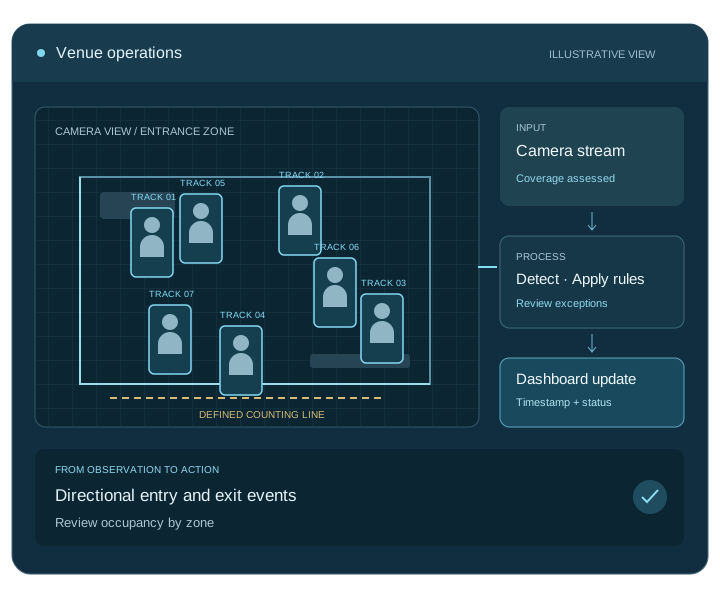
Count directional crossings at selected gates. Test simultaneous entry and exit movement with the expected crowd density.

Custom event analytics · Visitors, gates and venue zones
Give event teams a shared view of visitor movement. Digittrix develops camera-based analytics for entry and exit counts, venue zones and occupancy estimates. Bring gate activity, camera status and alerts into one dashboard, so staff can review changing conditions and coordinate their response.
Built around your workflow
Integrated with your operation
Tested with your team
The service, explained
Event crowd analytics uses camera views to count directional entries and exits and estimate activity in venue zones. We develop the gate setup, dashboards, notifications and reports around your event layout and operating procedures.
What we build
Choose the features your team needs. We agree the scope, system connections and success criteria before development.
Count directional crossings at selected gates. Test simultaneous entry and exit movement with the expected crowd density.
Combine valid entries and exits with a starting count. Show reset rules, coverage gaps and disconnected cameras to operators.
Monitor selected halls, registration areas or food courts. Compare local activity with the wider venue view.
Send threshold notifications to the right staff. Define acknowledgement, escalation and the response each alert requires.
Review arrival patterns and busy periods after the event. Export time-based reports to support planning for the next venue or date.
Connect supported registration and event systems. Label ticket scans and camera counts clearly so teams understand the source of each figure.
How the software works
Map gates, camera views and monitored zones.
Record agreed entry and exit events.
See estimated occupancy and camera status together.
Route updates to event operations and retain reports.
Connect the complete workflow
We check access, compatibility and data ownership early. Each connection needs clear rules for permissions, failed requests and recovery.
| Connection | What we connect | What we check first |
|---|---|---|
| Venue cameras | Gates, halls and monitored zones | Placement, crowd density and temporary connectivity |
| Event systems | Registration, ticketing and venue dashboards | API access and separate definitions for scans and camera counts |
| Team notifications | Alerts, acknowledgements and reports | Recipients, escalation paths and operator procedures |
Test before you roll out
We agree measurable targets with your team and test representative inputs, including the difficult cases.
Compare entries and exits with checked samples, including simultaneous movement and peak crowd density.
Test starting counts, missed exits, re-entry and reset rules; show gaps or disconnected cameras to operators.
Test notification delivery, acknowledgement and escalation with the venue team’s own response procedures.
Scope, cost and delivery
Start with one location and a clear operational question. We assess the footage, test a pilot and agree the development milestones with your team.
We provide a project-specific estimate and milestones after discovery. Your proposal separates development from ongoing operating costs.
Get a project estimateWe agree source-code and licence terms, deployment access, documentation, team training and support responsibilities in your proposal.
Map the workflow, inputs and system connections.
Test the core task and agree acceptance targets.
Build the application, integrations and admin tools.
Validate, deploy, train your team and start agreed support.
Your development partner
Digittrix Infotech Private Limited builds business software from Mohali, India. Explore our team, published work and client feedback as you choose your development partner.
Answers before you build
Yes, with suitable views and directional counting rules. We test the gate layout, lighting, crowd density and coverage before the team uses the counts operationally.
The core workflow counts people and movement without identifying attendees. Registration matching or identity features require a separate design.
We can estimate occupancy from a starting count and subsequent entries and exits. The dashboard must account for missed events, coverage gaps, re-entry and reset rules.
Yes. Your team sets the thresholds, recipients and response procedures. We test delivery, acknowledgement and escalation before the event.
Yes, but each venue needs its own camera assessment, zone setup and validation. Temporary installations also need a workable network and setup plan.
Gates, monitored zones, peak crowd density, alert channels and reporting needs drive scope. Reuse across venues and connections to event systems add development work.
Let’s plan your project
Tell us about your locations, camera setup and current systems. We will help you define a practical development plan.
Service information updated .