Lead routing and CRM updates
Identify what each enquiry needs, create or update the customer record and assign it to the right team. Prepare follow-up tasks so staff can act on the request.

Custom AI automation services · Your workflows, connected
Free your team from repetitive admin. Digittrix builds custom AI business automation software that processes enquiries, checks documents and updates your existing systems. Your team controls approvals and handles exceptions. Start with one workflow, measure the results and expand what works.
Built around your workflow
Integrated with your operation
Tested with your team
Leading companies choose Digittrix for our reliability, innovation, and consistent results.


The service, explained
AI business process automation uses artificial intelligence to interpret information and software rules to complete the next step. For example, AI can read an order email and extract the requested items. The workflow checks those details, asks a person to approve the order and updates your business software. Digittrix develops the application, integrations and review tools around your process.
What we build
Choose the features your team needs. We agree the scope, system connections and success criteria before development.
Identify what each enquiry needs, create or update the customer record and assign it to the right team. Prepare follow-up tasks so staff can act on the request.
Sort support tickets, find approved answers and draft replies for review. Send unclear requests to staff with the conversation and relevant account details.
Extract fields from invoices, orders and forms. Check totals and reference records, then ask staff to resolve exceptions before the workflow updates your finance system.
Check submitted details, request missing documents and route tasks to HR, IT or the relevant approver. Track outstanding steps so each team knows what to do next.
Check order details against connected product or stock records. Create routine tasks, flag missing information and notify the responsible team when a step needs attention.
Prepare scheduled reports from approved business data. Help staff find answers in internal documents, show the source and distinguish recorded facts from AI-generated summaries.
How the software works
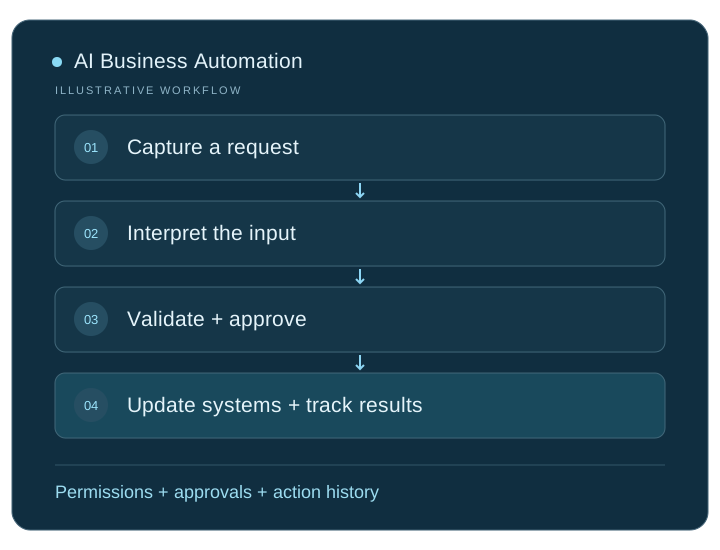
Start from an email, form, document, scheduled task or supported system event. Check access and record where the request came from.
Use AI to identify the request, extract the required details and find relevant information in approved sources. Prepare the result for validation.
Validate required fields and business rules. Send uncertain results or sensitive actions to a named reviewer before proceeding.
Update the authorised system and record the outcome. Handle failed connections with safe retries or a review task, and check for duplicates before repeating an action.
Connect the complete workflow
We check access, compatibility and data ownership early. Each connection needs clear rules for permissions, failed requests and recovery.
| Connection | What we connect | What we check first |
|---|---|---|
| Customer channels | Email, website forms, support desks and approved messaging accounts | Account permissions, message formats, consent rules and human handoff |
| Business applications | Customer relationship management (CRM), enterprise resource planning (ERP), finance and inventory software | Connection options, record matching, usage limits and duplicate prevention |
| Business knowledge | Approved documents, internal guides and reference records | Who maintains each source, how current it is and who can access it |
| Automation platforms | Existing workflow tools, task queues and custom applications | Run history, error handling, hosting and recurring usage costs |
Test before you roll out
We agree measurable targets with your team and test representative inputs, including the difficult cases.
Test representative requests against outcomes checked by your team. Measure correct classifications, valid data and completed actions, including unusual inputs.
Compare processing time, staff review time and error rates with the current process. Include AI usage, hosting and maintenance costs to assess whether the pilot delivers enough value.
Test missing data, repeated requests and unavailable systems. Confirm permission limits, approval steps and recovery behaviour before allowing production actions.
Scope, cost and delivery
Start with a frequent task that slows your team down. We map the steps, review sample inputs and check access to your systems. Together, we agree what the pilot must achieve, what it will cost and who will review its results.
We provide a project-specific estimate and milestones after discovery. Your proposal separates development from ongoing operating costs.
Get a project estimateWe agree source-code and licence terms, deployment access, documentation, team training and support responsibilities in your proposal.
Map the workflow, inputs and system connections.
Test the core task and agree acceptance targets.
Build the application, integrations and admin tools.
Validate, deploy, train your team and start agreed support.
From development to handover
Your proposal defines the deliverables for the agreed workflow, from working software to handover and support.
We build the agreed triggers, AI processing, business rules and integrations. We test the complete process, including missing data, duplicate requests and failed connections.
We give your team the controls the workflow needs: approvals, corrections, escalation and a way to stop processing. Activity records help staff investigate errors and follow each request.
We agree deployment access, documentation, training and support responsibilities before development. Your proposal sets out source-code ownership and any third-party licence or usage fees.
Your development partner
Digittrix Infotech Private Limited builds business software from Mohali, India. Explore our team, published work and client feedback as you choose your development partner.

Answers before you build
Choose a frequent, repeatable task with clear inputs, a named owner and an outcome you can measure. Enquiry routing, invoice checks and internal approvals are useful starting points to assess. Record how much time the task takes today, including corrections. Then test one workflow before expanding to other departments.
Digittrix provides custom software development. We build the workflow, integrations and review tools around your business. Your project may use third-party AI models or automation services with separate usage fees; we explain those costs in the proposal.
Rule-based automation follows defined conditions. Robotic process automation, or RPA, often carries out repeated steps in an existing software interface. AI adds capabilities such as interpreting text, classifying requests and preparing responses. A practical workflow can combine all three, depending on the task and system access.
Yes, when your systems offer suitable connections. We assess application programming interfaces (APIs), event notifications called webhooks, and import or export options. We check permissions and limitations during discovery. If a system lacks a reliable connection, we explain the alternatives and maintenance needs before agreeing the scope.
Yes. We can develop agents that use agreed tools within a defined workflow. We restrict their permissions, validate their proposed actions and add approval steps where needed. A pilot checks whether an agent is useful or a simpler fixed workflow would be more reliable.
Yes. We can build review queues, correction tools, escalation rules and a way to stop the workflow. Your team decides which actions can run automatically and which need approval. The application records decisions so staff can trace what happened.
Cost depends on workflow complexity, integrations, data preparation and review requirements. We provide an estimate after discovery and use a pilot to resolve uncertain requirements. The proposal separates development costs from AI usage, third-party licences, hosting and support.
The timeline depends on scope, system access, data readiness and testing. We agree milestones after reviewing those inputs. A focused pilot lets you evaluate one workflow before committing to a wider rollout.
We assess your cloud or on-site environment and the requirements of the selected AI components. We agree data storage, external processing, access permissions and deployment responsibilities before development. The available options depend on your systems and chosen models.
Compare the pilot with a measured baseline. Track completed tasks, accuracy, review effort, processing time and total operating cost. Expand only when the workflow meets the acceptance criteria your team agreed and handles exceptions reliably.
Yes. We review your current workflows, integrations and failure points before recommending changes. We can assess where AI would help interpret inputs or handle varied requests, while retaining reliable rules and connections. We propose a rebuild only when the existing setup cannot reasonably meet the agreed requirements.
We agree monitoring and support responsibilities before launch. The support scope can cover failed runs, changes to connected systems, AI output quality and workflow updates. Your team also needs a named owner to review exceptions and approve changes. We define ongoing fees and response arrangements in the proposal.
Plan the connected workflow
Plan shared records, permissions and reliable updates across business systems.
Extract and validate data before it enters your wider business workflow.
Review process selection, data preparation and ways to measure the result.
Let’s plan your project
Tell us which task slows your team down and which tools you use. We will help you scope a custom AI workflow, define a pilot and estimate the development work.
Service information updated .