+91-8727000867
 +64 22 003 5555

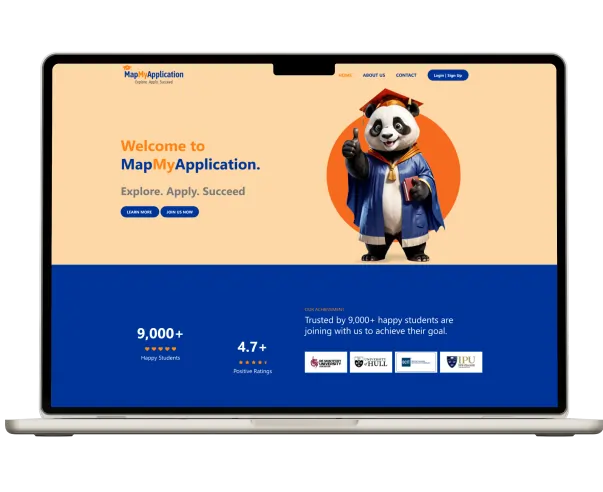
Published CRM project
MapMyApplication CRM and mobile app
The published project covers student lead records, document uploads, college and offer-letter tracking, team chat and task management.
Explore the project

Selected organizations shown across Digittrix's broader product portfolio. These are cross-industry references—not immigration CRM case studies.












Immigration CRM software is a customer relationship management system for enquiries, applicants, visa cases, documents and communication. It helps counselors see the next action and managers understand the team's workload.
A custom immigration CRM solution connects your chosen visa categories, document checklists, branch permissions and reporting. Your team controls the internal workflow; application decisions remain with the relevant authorities.
Explore the published project and the related planning guide. The guide is a resource, not a separate client case study.
The published project covers student lead records, document uploads, college and offer-letter tracking, team chat and task management.
Explore the project
Review case preparation, task ownership and document workflows when defining your immigration CRM requirements.
Explore the guideThe project image comes from the published case study. The guide uses a service illustration. Performance metrics and independent endorsement are not implied.
Connect the commercial side of your consultancy with client records and case work. Agree the services and payment rules before building automation.

Record the service, appointment, agreed fee and payment status. Link the consultation to the enquiry and assigned counselor.
Track the agreed package and payment milestones for the client’s engagement. Separate consultancy charges from third-party fees.
Scope referral attribution, agreed commission rules and approval steps where your business uses agent relationships.
Record provider-confirmed payments and review outstanding fees using the agreed reconciliation workflow.
Choose the closest operating model. The scope can combine modules across these options after reviewing your requirements.

Connect enquiries, appointments, counselor assignments and client communication in a custom immigration consultancy CRM.

Scope a visa case management system around your case categories, checklists and review stages. The software organizes internal work and records the updates your team receives.

Bring branches, counselors, referrals and fee records into an immigration agency CRM with defined access and consolidated reporting.

Adapt immigration consultant software for overseas education teams that manage student enquiries, colleges, supporting documents and offer-letter tracking.

Plan a migration management software workflow around the practice’s actual responsibilities. Immigration law firm CRM and practice-management requirements need their own review of roles, matter access and professional processes.

Evaluate AI document processing, enquiry summaries and draft communication within approved data-access and human-review workflows.
Plan the software around how your team acquires clients, prepares cases and hands work between counselors.
Map visa categories, case stages, team roles and exception paths. Your immigration CRM developer turns those requirements into screen flows and a prioritized development scope.
Build the agreed modules, permissions, reports and portal in phases. As an immigration CRM software development company, Digittrix connects implementation decisions to the way your consultancy operates.
Review existing exports, connect approved providers, validate records and train your team. Agree hosting, handover and support responsibilities before the immigration CRM system goes live.
Explore how CRM software for immigration consultants can support counselors, applicants and managers.
Immigration lead management software captures enquiries from agreed website and campaign integrations, assigns counselors and flags overdue follow-ups. Immigration CRM lead tracking keeps the source, contact history and next action together.
Immigration applicant management software can organize contact details, visa category, education history and assigned counselor. Keep related applicants and files connected in your immigration client management software.
Track consultation, document review, submission and decision stages. Immigration case tracking software shows the last update, task owner and outstanding actions for each case.

Scope a private applicant workspace for requested documents, shared updates and information requests. Each client sees the records and case details their permissions allow.
Build case-specific checklists, document uploads and review statuses. Immigration CRM document tracking highlights missing files and records requests for corrected documents.
Immigration CRM appointment management can support consultation requests and reminders. Visa application tracking software displays team-entered updates or data from an agreed integration.
View case-stage totals, overdue tasks, lead response times and outstanding fees. Define immigration CRM analytics by counselor, branch and enquiry source using consistent metric definitions.
Set triggers for assignments, reminders and escalations. Immigration workflow automation should identify the responsible person and what happens when an action is overdue.
Configure roles and branch visibility for your immigration agency CRM. Track fee status, agreed payment integrations and reconciliation without exposing restricted client records.
Review the screens your team will use every day. Our design scope can cover navigation, forms, document requests, review states and accessible interaction patterns.
These illustrative concepts show possible counselor, applicant and administrator screens. They are not delivered client screenshots or working application controls. Final screens are designed around the agreed workflows.
01 · CounselorAssigned counselor, service interest, source and a clear next action.
Open client recordA focused lead and follow-up workspace.
02 · ApplicantRequested documents, upload status and information your counselor has shared.
Review checklistClient portal concepts that explain the next step.
03 · Case workerDocument review states, missing information and a record of the responsible person.
Record reviewCase preparation with explicit review ownership.
04 · AdministratorOpen cases, overdue tasks, counselor assignments and agreed reporting definitions.
View workloadOperational reporting for the administrator workspace.
Scope the public enquiry journey and private workspaces together so information stays connected between teams and clients.
Mobile access can begin with a responsive web interface. A separate mobile app is scoped around your users and device requirements.
Explore web development servicesService pages, forms and campaign attribution connected to the agreed lead-management workflow.
Authenticated access to document requests, appointments and the case information your team chooses to share.
Responsive counselor and administrator workspaces, with separately scoped mobile app requirements where needed.
Design immigration workflow management software around clear responsibilities, visible document requests and timely updates.
Concept view for planning a custom CRM. These are example stages, not a screenshot of a delivered client system.
Source recorded. Counselor assigned. Consultation follow-up planned.
Applicant receives a case-specific list and uploads requested files.
Case worker reviews the files and requests any missing information.
The team records the latest status and shares the next step with the client.
A custom CRM for immigration consultants can show outstanding documents, shared case updates and appointment requests. Internal notes and team-only files remain restricted.
Your visa document management system links checklists and files to the right case. Immigration CRM application tracking reflects entered information; it does not determine eligibility or guarantee an authority’s decision.
The same core records can support different services. Discovery defines the fields, access rules and stages for your organization.
Use an immigration consultancy CRM for lead follow-ups, applicant records and case preparation. Immigration consultancy software development can connect the tools your counselors currently manage separately.
Scope visa consultancy CRM software for appointments, document checklists, fees and application updates. Visa CRM development adapts the workflow to the categories and destinations you support.
A migration agency CRM can organize counselors, branches and referrals. Agree the local terminology, reporting and permissions needed in your migration consultancy CRM.
Immigration law firm CRM requirements may include matter permissions and review checkpoints. Immigration practice management software needs separate discovery from a student admissions or offer-letter workflow.
Bring communication and fee tracking into the case workflow, with provider requirements and account ownership agreed upfront.
| Integration | Example workflow | Requirements to confirm |
|---|---|---|
| Immigration CRM WhatsApp integration | Document reminders, appointment messages and selected case updates | Business messaging provider, approvals, consent, templates and usage charges |
| Immigration CRM email automation | Assigned follow-ups and communication history | Mail provider access, sender configuration, permissions and delivery limits |
| Immigration CRM SMS integration | Time-sensitive reminders and notifications | Destination coverage, consent, messaging provider and per-message costs |
| Immigration CRM payment integration | Payment links, transaction status and outstanding fees | Account, currency, fees, callbacks and reconciliation rules |
Confirm which provider accounts you already hold, who can approve API access and who will handle failed messages or payment callbacks after launch.
An AI immigration CRM adds assisted tasks to lead, document and case workflows. Evaluate the use case, data access and review process before adding AI immigration software to your consultancy's operations.
An automated immigration CRM can already run rule-based reminders, assignments and escalations. AI-assisted features add capabilities such as extracting fields, summarizing information or drafting replies, subject to evaluation and review.
The goal of an intelligent immigration CRM is to make the next action easier to identify. Scope each feature around a defined input, an expected output and a person responsible for checking it.
AI capabilities are options to evaluate during discovery. Availability and suitability depend on the use case, provider terms, source quality and data-handling requirements.
Evaluate extraction of selected fields from permitted documents and suggestions for document classification. Review extracted values against the source and route unclear files to a case worker.
Scope a chatbot for approved service FAQs, enquiry intake and appointment requests. Define the knowledge source, handoff to a counselor and limits on the information it can access or provide.
Evaluate enquiry summaries, draft follow-ups and routing suggestions based on service interest and team availability. Counselors review the suggested action; lead handling is separate from visa eligibility assessment.
Explore internal summaries of permitted case notes and documents, with links back to the supporting records. A case worker checks the summary before it informs further action or client communication.
AI-powered visa management software can be scoped to assist with document organization and draft information requests. It does not establish eligibility, replace professional review or control government decisions.
A general CRM can support some consultancy workflows through configuration. Specialist software and custom development offer different trade-offs.
| Decision | General CRM | Immigration SaaS | Custom immigration CRM |
|---|---|---|---|
| Workflow fit | Configure fields, stages and automations | Assess the product’s existing visa workflows | Build the agreed workflows around your team |
| Documents & portal | May require configuration or add-ons | Check included features and plan limits | Scope checklists, permissions and applicant views |
| Integrations | Depends on APIs and connectors | Depends on the product and subscription | Scope provider access, development and maintenance |
| Getting started | Configuration, imports and training | Product onboarding and data migration | Discovery, development, validation and launch |
| Cost & ownership | Check licenses, add-ons and exports | Check recurring fees and data portability | Agree source-code handover, hosting and support |
Select an engagement around the work you need now, whether you are defining a new system or improving an existing one.
Review workflows and create a written scope, interface direction and delivery plan. Output: agreed requirements
Develop and validate the prioritized modules with review points and acceptance criteria. Output: tested releases
Assess the current code, dependencies and data before agreeing enhancements or ongoing support. Output: improvement backlog
The cost of immigration CRM development depends on your workflows, user roles, integrations and existing data. Compare the starting scopes below, then request a proposal with defined inclusions and delivery milestones.

| Starting scope | Typical inclusions to agree | Estimate basis |
|---|---|---|
| Core consultancy CRM | Leads, applicant records, checklists and internal case stages | Defined workflows and acceptance criteria |
| Portal and integrations | Client access, selected providers, migration and training | Integration access and data quality |
| Branch and agency CRM | Role visibility, advanced assignment and consolidated reporting | Branch rules, reporting and deployment requirements |
These are scope examples, not fixed packages. Development, hosting, provider usage and support are itemized in the proposal.
Your custom immigration CRM cost should separate the initial build from the services needed to operate it. Review the same inclusions when comparing development proposals or subscription products.
| Cost component | What affects the estimate | What to confirm |
|---|---|---|
| Core software build | The cost to build immigration CRM software includes discovery, interface design, development, testing and deployment for the agreed modules. | Deliverables, acceptance criteria, training and handover |
| Visa workflows | Visa CRM development cost changes with the number of case categories, review stages, branch rules and client-facing actions. | Supported workflows, exceptions and role permissions |
| Cases & documents | Immigration case management software cost depends on document checklists, storage, access controls, migration and reporting requirements. | File volume, existing exports and validation effort |
| Integrations & AI | Provider setup, account access, evaluation and maintenance add work. Model usage, messaging, storage and payment-provider charges may recur. | One-time setup, recurring usage and account ownership |
Immigration software development cost is one part of the budget. Include hosting, backups, ongoing support and provider usage when comparing the total cost of ownership. Immigration CRM development is quoted for an agreed scope. Share your team size, case categories, current tools, integrations and a sample of the records to migrate. Your written estimate should identify deliverables, assumptions, exclusions, currency, payment milestones, recurring charges and a delivery schedule. Discovery, design review, integration access, sample migration and user acceptance testing are agreed before a launch date is committed.
A focused first release gives your team a usable core workflow. Define the acceptance criteria for that release and keep later additions visible in the roadmap.
Prioritize assignments, document checklists and internal case stages with the reporting your team needs to operate the first release.
Review the starting scope →Include the portal or provider connection in the first release when it is essential. Agree access, shared statuses and communication before implementation.
Review portal cost factors →Approve the first release when your team can complete the agreed enquiry-to-case workflow and its acceptance checks. Record deferred requirements in the roadmap.
| Workflow | Focused first release | Possible later phase |
|---|---|---|
| Leads & clients | Core records, assignments and follow-ups | More lead sources and advanced routing |
| Cases & documents | Agreed stages, checklists and review status | More visa categories and review automations |
| Client access | Document the portal requirements | Portal release or additional client actions |
| Reporting | Core workload and follow-up views | Consolidated branch and source reporting |
Before adding a later phase, confirm its dependencies, migration impact and acceptance criteria with the staff who will use it.
Your team reviews the workflow and screens before implementation, then validates the system against agreed acceptance criteria.

Document case categories, user roles, current tools and reporting needs. Identify the work that belongs in the first release.

Create screen flows for counselors, applicants and administrators. Review permissions, empty states and exception paths.

Develop agreed modules and integrations. Verify provider access and failure handling for messaging and payments.

Check permissions, uploads, reminders and reporting. Run user acceptance testing and sample migration checks with your team.

Agree the cutover plan, train counselors and administrators, and verify the production workflows after release.

Document support hours, response targets and maintenance ownership. Prioritize further changes using feedback and operational measurements.
An existing immigration client management system may need clearer workflows, better integrations or a phased rebuild. Review what can be retained before replacing it.
Start with the records, workflows and integrations your team relies on.
Import a representative sample and reconcile the results with your team.
Agree the transition before changing where staff enter new work.
Your custom immigration CRM should reflect the sensitivity of client records and the responsibilities of each team member.
Scope role-based permissions, protected storage, encrypted connections and audit records. Agree hosting region, retention, backups and recovery checks for the project.
Document custom source-code handover, data ownership, exports and account access. Third-party components and services retain their own licensing terms.
Document administrator access, provider accounts, release instructions and the people responsible for each service. Review ongoing maintenance in the support section below.
MapMyApplication’s published stack includes Laravel, Bootstrap, MySQL and AWS. The categories below explain the implementation decisions for your own system.
Technology choices are finalized during discovery against your scope, integration, security and ownership requirements.
Bootstrap is documented in the MapMyApplication project. Select the interface approach around the screens, accessibility requirements and devices in your scope.

Bootstrap interface
Responsive web layouts
Role-specific navigation
Forms and document requests
Interface accessibility checks
Laravel is documented in the published project. Application services can manage assignments, case states, permissions and approved integrations.

Laravel workflows
Case and workflow rules
Role and branch permissions
Messaging and payment callbacks
Background tasks and retries
MySQL is documented in the published project. Model the relationships and validation rules before importing client information.
MySQL records
Applicant and case relationships
Document metadata and access
Import validation and deduplication
Defined reporting metrics
AWS is documented in the published project. Hosting services, storage and operating responsibilities are selected for your deployment.

AWS deployment
Hosting and access requirements
Protected document storage
Backups and recovery checks
Monitoring and maintenance ownership
Scope communication and payment integrations around approved provider access, callback handling and ongoing account responsibilities. Provider usage is separate from the CRM build.
Provider integrations
Messaging provider access
Payment callbacks
Usage and account ownership
Error handling and retries
A scalable design starts with explicit access rules and realistic workload assumptions, rather than an untested capacity claim.
Define the number of users, branches, active cases, document sizes and busiest enquiry periods. Performance targets should be agreed and tested against representative workloads.
Define which branch and role can access each record, and which managers can see consolidated information.
Plan queues, retries and failure visibility for imports, notifications and document processing.
Measure agreed response times and operational limits. Review storage, backup and recovery requirements as the system grows.
Agree a baseline before launch, then compare equivalent reporting periods. Measure your team’s operations separately from government processing times.
Measure elapsed time from enquiry receipt to the first counselor response. Track the share of due follow-ups completed on time, using the same reporting period.
Monitor required files received and reviewed, overdue tasks and open cases by internal stage.
Review outstanding fees, counselor assignments and branch workload using agreed definitions.
Support is an agreed service. Document hours, response targets, maintenance scope and the handoff between your team, hosting providers and developers.
Agree how fixes, dependencies, security updates and compatibility changes are assessed and released.
Identify who handles changed APIs, messaging templates, payment callbacks and account or usage limits.
Record operational ownership, incident contacts, backup expectations and recovery-check responsibilities.
Use staff feedback and reporting to prioritize refinements. Confirm scope, testing and acceptance for each change.
Choose an immigration CRM company by reviewing its relevant work and the commitments in your proposal.
Review the counselor, applicant and administrator journeys before agreeing the build scope.
Agree the screens, phased deliverables, review owners and acceptance criteria that guide implementation.
Clarify custom code, data exports, provider accounts, training and support responsibilities in the agreement.
Your consultancy’s location and operating markets inform the system requirements. Service availability does not imply an office in every listed country.
Digittrix’s India office is in Mohali, Punjab. Discuss remote delivery for teams in India, the United States, the United Kingdom, Canada, Australia and New Zealand.
Review the relevant CRM project, wider portfolio and available client feedback before agreeing your own scope.
Review the published scope for student leads, documents, team collaboration and offer-letter tracking.

Explore additional Digittrix projects and the capabilities described in their published case studies.
Read the available feedback and discuss the delivery expectations for your own project.
The CRM card links to the published project. The portfolio and feedback cards show the Digittrix team and link to broader evidence; they are not additional immigration client projects.
Review the project scope, workflow guidance, AI review requirements and provider comparison before preparing your brief.
Answers about development cost, AI-assisted workflows, integrations, migration, data ownership and support.
Tell us your team size, visa workflows, current tools, integrations and migration needs. We can turn those requirements into a written development scope and delivery plan.
Where we work: India, the United States, the United Kingdom, Canada, Australia and New Zealand.
Enhance efficiency with creative business solutions that drive productivity and revenue. Contact us for tailored solutions designed specifically for your business
 Request Instant Call
 Hire Remotely